

Skip to content
  1. Home
  2. Compare
  3. Toggl alternatives

Toggl alternatives

Toggl alternatives: Staffic adds screenshots and activity.

Toggl alternatives come up when tracked hours aren't enough. Toggl tracks time and plans work with no screenshots, by design. Staffic tracks time with screenshots, keyboard and mouse activity levels, and the apps and URLs each member uses, on Windows, macOS and Linux. Every Toggl fact below comes from Toggl's own website.

Last checked

Sources (4)

Quick verdict

Staffic or Toggl: the short answer.

The short answer

Choose Staffic if you need proof of work beside the hours: screenshots, keyboard and mouse activity levels, and apps and URLs your admins can review, plus payroll and invoices on Elite. Choose Toggl if you want time tracking without screenshots, with planning, capacity and profitability reports in the same app.

Choose Staffic if you want

  • Screenshots on Standard and Elite, taken only while the timer runs
  • Keyboard and mouse activity levels and apps and URLs on every plan
  • Payroll and client invoices together on Elite
  • A desktop app for Linux, as well as Windows and macOS

Best for remote teams that want to see the work behind the hours.
Choose Toggl if you need

  • No screenshots or keystroke logging, by design
  • Boards, timeline views and capacity planning in one app
  • Labor cost and profitability reports on Premium
  • Desktop activity tracking that stays private to each user

Best for agencies and in-house teams that plan capacity without monitoring.

Feature by feature

Staffic vs Toggl, feature by feature.

17 rows in 5 topics. Every competitor fact links to its source.

Only differences
Staffic compared with Toggl
FeatureStafficFree for 3, then $5.50TogglFrom $9.00 per user
Plans and price3 rows
Free planStafficFree forever for up to 3 membersTogglFree forever for up to 3 users1
Lowest paid plan, billed yearlyStafficStandard, $5.50 per user ($1.00 during the current offer)TogglStarter, $9 per user1
Lowest paid plan, billed monthlyStafficStandard, $7.50 per userTogglStarter, $12 per user1
Proof of work6 rows
ScreenshotsStafficStandard and EliteTogglNone, by policy1
Screenshots per 10 minutesStaffic2 on Standard; 1, 2 or 3 on EliteTogglNot offered1
Keyboard and mouse activity levelsStafficEvery planTogglNot listed1
Apps and websitesStafficEvery plan; admins see them per memberTogglEvery plan; private to each user, Windows and macOS1
Idle timeStafficIdle after 50 seconds without inputTogglA prompt when the timer runs with no activity1
Screen recordingsStafficEliteTogglNot listed1
Timesheets and time off2 rows
Timesheet approvalStafficEliteTogglPremium, $16 per user1
Time offStafficLeave balances on Standard; requests and approval on EliteTogglStarter and up; approvals with the $2 Time Off Pro add-on1
Billing and payroll3 rows
PayrollStafficElite: hourly, monthly and fixed pay from tracked timeTogglNot built in; supplies hours and labor costs to your payroll tool3
Client invoicesStafficEliteTogglNot listed1
Profitability reportsStafficNo profit report; project budget, spent and billable amounts on Standard and EliteTogglPremium, with labor costs1
Platforms and AI3 rows
Desktop appsStafficWindows, macOS and LinuxTogglWindows and macOS1
MCP server for AI assistantsStafficEvery planTogglEvery plan1
AI in the appStafficStaffic AI answers questions about hours and activity, on EliteTogglAI Task Creator turns notes into tasks, every plan1
IncludedOn a higher planNot available, or not listedSource, listed at the end of the pageShowing 17 of 17 rows
How we compare

We read each company’s public pricing, download and help pages and note the date we checked each one. “Not listed” means the pricing page did not mention the feature on that date. Staffic prices come from the Staffic plans API, the same source as the Staffic pricing page.

Key differences

Where Staffic and Toggl really differ.

Four differences that change which tool fits. Pick one to read it and see it in Staffic.

Toggl says it doesn't take screenshots or record keystrokes, and calls that a deliberate product decision. Staffic takes screenshots on Standard and Elite, only while the timer runs: 2 per 10 minutes on Standard, and 1, 2 or 3 on Elite. Each member can see their own.

Staffic
Standard and Elite, members see their own
Toggl
None on any plan
How Staffic screenshots work

Toggl's desktop apps for Windows and macOS record the apps and websites you use for over 10 seconds, keep that data private, and let you choose what becomes a time entry. Staffic records keyboard and mouse activity levels and the apps and URLs used during each tracked session, on every plan, and admins see them per member.

Staffic
Admins see apps, URLs and activity
Toggl
Private to each user
How Staffic tracks apps

Toggl supplies approved hours and labor costs for payroll and says it doesn't calculate pay or make payments; its pricing page doesn't list client invoices. Staffic Elite works out hourly, monthly and fixed pay from tracked time, records each payment with a statement to the member, and adds clients and invoices.

Staffic
Payroll and invoices on Elite
Toggl
Labor costs on Premium, no invoices listed
How Staffic payroll works

Both free plans cover 3 people with no time limit. Toggl Starter is $9 per user billed yearly, and timesheet approvals need Premium at $16. Staffic Standard is $5.50 per user billed yearly and adds screenshots; timesheet approval is on Elite.

Staffic
Free for 3, then $5.50
Toggl
Free for 3, then $9
Compare Staffic plans
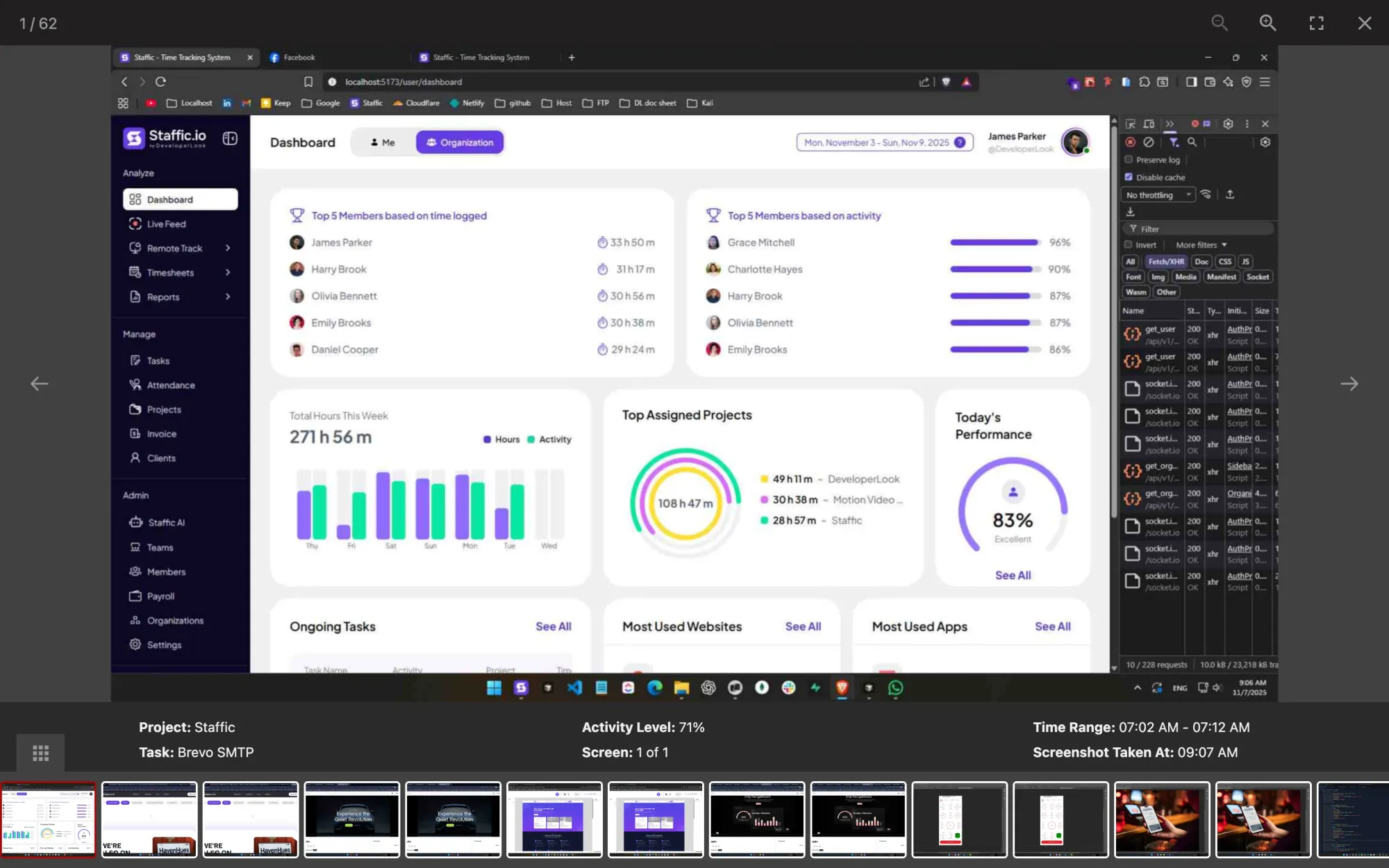
Staffic screenshot viewer: a capture for project Staffic, task Brevo SMTP, at 71% activity, 07:02 to 07:12 AM
One Staffic screenshot with its project, task and activity level

FAQ

Staffic vs Toggl, answered.

Short answers to what teams ask before they switch.

Explore the live demo

What is Toggl Track used for?

Toggl Track is used to track working time: you start a timer or log hours, then report them by project, client and member. In September 2026 Toggl made its new app, called Toggl, its flagship, with the same tracking plus planning and capacity tools; Track stays available for existing users.

Is Toggl Track free?

Yes, for up to 3 users. Toggl's Free plan includes timers, calendar views and personal reports, according to its pricing page on October 12, 2026. Staffic is also free for up to 3 members, and its Free plan adds keyboard and mouse activity levels and apps and URLs tracking.

How much is Toggl Track?

Toggl Starter is $9 per user per month billed yearly, or $12 billed monthly, and Premium is $16 or $24, according to Toggl's pricing page on October 12, 2026. Both come with a 30-day trial. Staffic Standard is $5.50 per user per month billed yearly ($1.00 during the current offer, until September 12, 2027).

Does Toggl Track take screenshots?

No. Toggl says it doesn't take screenshots or record keystrokes, and calls this a deliberate decision. If you need screenshots, a Toggl Track alternative such as Staffic takes them on Standard and Elite while the timer runs, and each member sees their own.

Does Toggl track activity?

Partly. Toggl's Windows and macOS apps record the apps and websites you use for over 10 seconds on a private timeline, and idle detection prompts you when the timer runs with no computer activity. Toggl doesn't list keyboard and mouse activity levels, which Staffic records on every plan.

Is Toggl Track safe?

Toggl says its security is independently audited and that your team's data stays your team's. Its desktop activity data stays private to each user, who decides what becomes a time entry. Staffic records more, such as screenshots and apps and URLs while the timer runs, and members can see their own records.

Hubstaff vs Toggl: which one takes screenshots?

Hubstaff does and Toggl doesn't. Hubstaff includes screenshots on every plan, limited on Starter, which is $4.99 per seat billed yearly with a 2-seat minimum; Toggl rules screenshots out. Both facts come from their pricing pages on October 12, 2026.

Free for up to 3 members

A Toggl alternative that shows the work.

Create a Staffic workspace, invite your team and see timesheets, activity levels and apps in one place.

  • No credit card
  • 7-day trial on paid plans
  • Windows, macOS, Linux


