

Skip to content
  1. Home
  2. Compare
  3. Harvest alternatives

Harvest alternatives

Harvest alternatives: time and billing, with proof of work.

Harvest alternatives make sense when billed hours need proof behind them. Harvest tracks time and turns it into invoices clients can pay online, but takes no screenshots. Staffic tracks time with screenshots, activity levels, and apps and URLs, then turns billable hours into invoices on Elite. Every Harvest fact comes from Harvest's own website.

Last checked

Sources (13)

Quick verdict

Staffic or Harvest: the short answer.

The short answer

Choose Staffic if you bill from tracked hours and need proof of the work behind them: screenshots, activity levels, and apps and URLs, plus payroll and invoices on Elite. Choose Harvest if invoicing is the center of your week, with online payments through Stripe or PayPal and no screenshots or app tracking.

Choose Staffic if you want

  • Screenshots on Standard and Elite, each with its project, task and activity level
  • Activity levels and apps and URLs on every plan, Free included
  • Invoices from a project's uninvoiced amount, and payroll, on Elite
  • A Harvest app alternative that also runs on Linux

Best for teams that bill clients and want to see the work behind each hour.
Choose Harvest if you need

  • Invoices on every plan, with online payments through Stripe or PayPal
  • Billable and cost rates per person from Teams
  • Profitability reports by client, project, task or team on Enterprise
  • Time tracking without screenshots or app and website tracking

Best for agencies and consultancies where invoicing is the core job.

Feature by feature

Staffic vs Harvest, feature by feature.

20 rows in 5 topics. Every competitor fact links to its source.

Only differences
Staffic compared with Harvest
FeatureStafficFree for 3, then $5.50HarvestFrom $9.00 per seat
Plans and price4 rows
Free planStafficUp to 3 members, no time limitHarvest1 seat and 2 active projects13
Lowest paid plan, billed yearlyStafficStandard, $5.50 per user ($1.00 during the current offer)HarvestTeams, $9 per seat1
Lowest paid plan, billed monthlyStafficStandard, $7.50 per userHarvestTeams, $11 per seat1
Charges beyond the seat priceStafficNone; no project limit on any planHarvestOn Flex billing: active projects, clients, tasks and invoicing above an allowance21
Proof of work4 rows
ScreenshotsStaffic2 per 10 minutes on Standard; 1, 2 or 3 on EliteHarvestNone8
Keyboard and mouse activity levelsStafficEvery planHarvestNot listed8
Apps and websites usedStafficEvery plan; admins see them per memberHarvestNot tracked8
Screen recordingsStafficEliteHarvestNone8
Time and timesheets3 rows
Idle timeStafficIdle after 50 seconds without input; tracking stops after 5 minutesHarvestMac and Windows apps ask after 10 minutes, by default7
TimesheetsStafficDaily, weekly and bi-weekly on every plan; monthly and custom on StandardHarvestDay and week views, every plan1
Timesheet approvalStafficEliteHarvestEnterprise, $14 per seat1
Billing and payroll6 rows
Hourly and fixed fee projectsStafficStandard and EliteHarvestTime and Materials or Fixed Fee, every plan1
Rates per personStafficBill and pay rates in member settings, EliteHarvestBillable and cost rates, Teams and up1
Client invoicesStafficElite, from a project's uninvoiced amount or fixed feeHarvestEvery plan; Free needs Stripe to email or export them13
Online invoice paymentsStafficNo; invoices show your bank details and payment instructionsHarvestStripe and PayPal4
Profitability reportsStafficNo profit report; spent and billable amounts per project on Standard and EliteHarvestEnterprise, by client, project, task or team1
PayrollStafficElite: hourly, monthly and fixed payHarvestNot listed1
Platforms and AI3 rows
Desktop appsStafficWindows, macOS and LinuxHarvestMac and Windows, plus Chrome, Firefox and Edge extensions56
MCP server for AI assistantsStafficEvery planHarvestWith an active Harvest account9
AI in the appStafficStaffic AI answers questions about hours and activity, on EliteHarvestHarvest AI assistant, in beta10
IncludedOn a higher planNot available, or not listedSource, listed at the end of the pageShowing 20 of 20 rows
How we compare

We read each company’s public pricing, download and help pages and note the date we checked each one. “Not listed” means the pricing page did not mention the feature on that date. Staffic prices come from the Staffic plans API, the same source as the Staffic pricing page.

Key differences

Where Staffic and Harvest really differ.

Five differences that change which tool fits. Pick one to read it and see it in Staffic.

Harvest supports Time and Materials and Fixed Fee projects on every plan, and adds billable and cost rates per person from Teams. Staffic bills a project by the hour or at a fixed fee on Standard and Elite, and shows its spent, billable and uninvoiced amounts. Per-person bill rates sit in member settings on Elite.

Staffic
Project billing from Standard
Harvest
Hourly and Fixed Fee on every plan
See time and billing in Staffic

Harvest includes invoicing on every plan, and clients can pay online through Stripe or PayPal; on the Free plan, emailing or exporting an invoice needs Stripe. Staffic invoices are on Elite: a line can pull in a project's uninvoiced amount, and you record each payment against the invoice. Clients see your bank details and payment instructions.

Staffic
Elite, paid to your bank details
Harvest
Every plan, paid online
How Staffic invoices work

Harvest's help center says it takes no screenshots or video recordings and doesn't follow which apps or websites you open. Staffic records keyboard and mouse activity levels and the apps and URLs of each tracked session on every plan. It takes screenshots on Standard and Elite, only while the timer runs, and each member can see their own.

Staffic
Activity on every plan, screenshots from Standard
Harvest
Time entries without screenshots
See what Staffic screenshots show

Harvest's Free plan covers 1 seat and 2 active projects; Teams is $9 per seat billed yearly, or $11 monthly. Accounts on Flex billing also pay for active projects, clients, tasks and invoicing once they pass the allowance their plan includes. Staffic is free for up to 3 members and has no project limit; Standard is $5.50 per user billed yearly.

Staffic
Free for 3, then $5.50
Harvest
1 seat free, Teams from $9
Compare Staffic plans

Timesheet approval needs Harvest Enterprise, at $14 per seat billed yearly, and Harvest's pricing page lists no payroll. Staffic Elite has both: you approve timesheets, then payroll turns tracked time into hourly, monthly and fixed pay.

Staffic
Approval and payroll on Elite
Harvest
Approval on Enterprise, no payroll listed
How Staffic payroll works
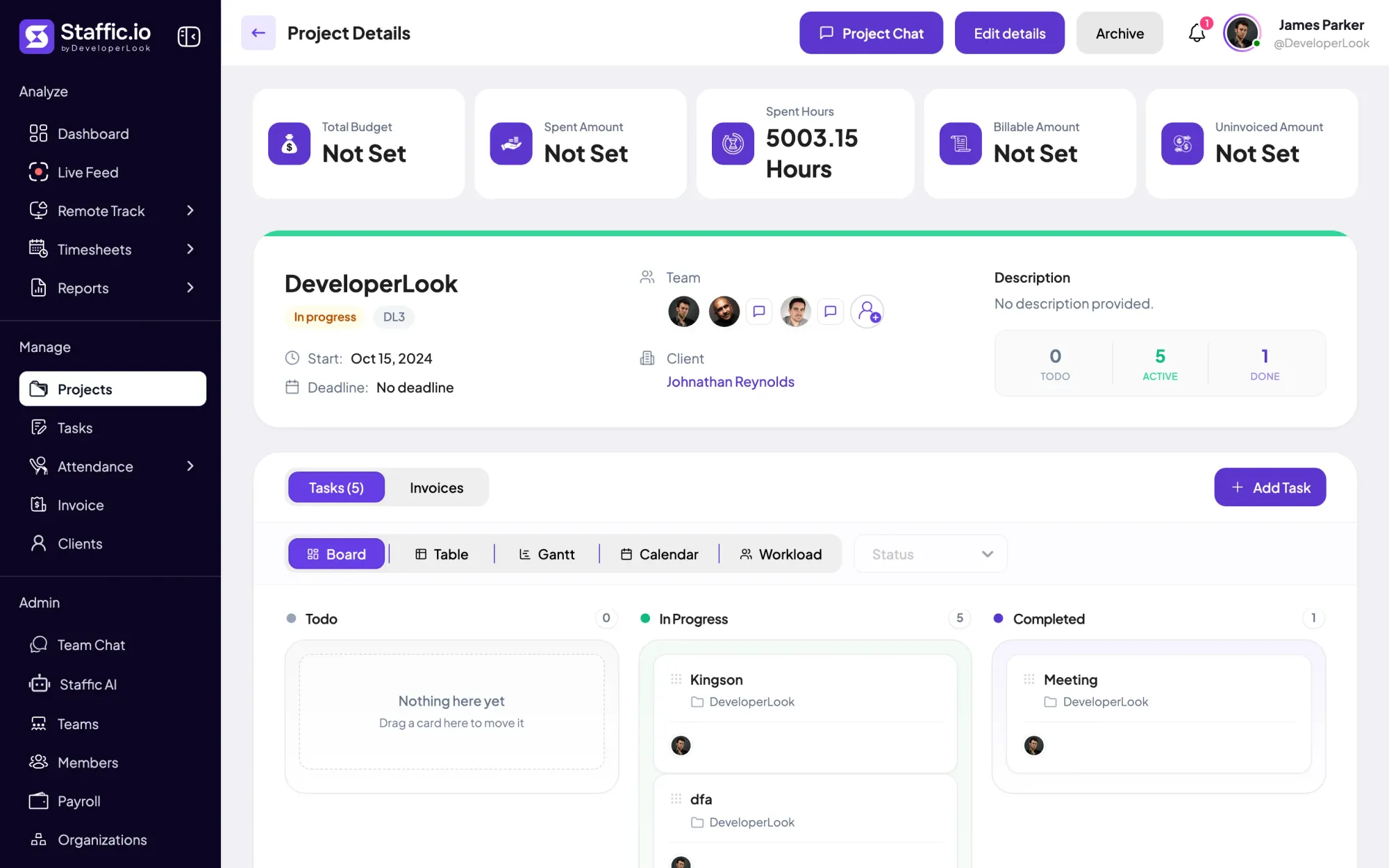
Staffic project details for DeveloperLook: 5003.15 spent hours, team, client and a task board
A project's budget, spent, billable and uninvoiced amounts, in Staffic

FAQ

Staffic vs Harvest, answered.

Short answers to what teams ask before they switch.

Explore the live demo

What is Harvest time tracking?

Harvest is time tracking and invoicing software for teams that bill for their time. You track hours against projects and tasks, follow budgets and team capacity in reports, and turn the hours into invoices. It runs in the browser and in desktop apps for Mac and Windows.

How does Harvest time tracking work?

You start a timer or add hours to your day or week view, in the browser, the Mac or Windows app, or a Chrome, Firefox or Edge extension. Each entry goes to a project and task, updates its budget, and can then go on an invoice. The desktop apps ask what to do with idle time after 10 minutes, by default.

How much is Harvest time tracking?

Harvest Teams is $9 per seat a month billed yearly, or $11 monthly, and Enterprise is $14 or $17.50, according to Harvest's pricing page on October 12, 2026. On Flex billing, active projects, clients, tasks and invoicing above an allowance cost extra. Staffic Standard is $5.50 per user billed yearly ($1.00 during the current offer, until September 12, 2027).

Who owns Harvest time tracking?

Bending Spoons. Harvest's terms of service name Bending Spoons Operations S.p.A., in Milan, Italy, as the company that provides Harvest, as of October 12, 2026. Harvest itself started in 2006, built by two small business owners who ran a web design agency in New York City.

Does Harvest time tracker take screenshots?

No. Harvest's help center says it doesn't take screenshots or video recordings, or track websites and apps. If you need them, an alternative to Harvest such as Staffic takes screenshots while the timer runs: 2 per 10 minutes on Standard, or 1, 2 or 3 on Elite.

Is Harvest time tracking free?

Yes, for 1 person with up to 2 active projects. On the Free plan you can't email invoices or export them as PDFs unless you connect Stripe, according to Harvest's help center on October 12, 2026. If you need a free alternative to Harvest for a small team, Staffic is free for up to 3 members.

Harvest vs Clockify: which costs less?

Clockify. Its Basic plan is $3.99 per seat a month billed yearly, against $9 for Harvest Teams, according to their pricing pages on October 12, 2026. Clockify's Free plan also goes further: up to 5 users, against 1 seat on Harvest. In a Clockify vs Harvest choice, invoicing sits on Clockify Standard at $5.49 and on every Harvest plan.

Free for up to 3 members

A Harvest alternative with proof of work

Among Harvest time tracking alternatives, Staffic starts free for 3 members with activity levels and apps and URLs. Screenshots come with Standard; invoices and payroll with Elite.

  • No credit card
  • 7-day trial on paid plans
  • Windows, macOS, Linux


