

Skip to content
  1. Home
  2. Compare
  3. Insightful alternatives

Insightful alternatives

Insightful alternatives: Staffic adds payroll and invoices.

Insightful alternatives make sense when analytics aren't the whole job. Insightful tracks time, apps and websites, blurs screenshots by default, and lists payroll and invoicing as coming soon. Staffic tracks time on projects and tasks with screenshots and activity levels, and adds payroll and client invoices on Elite. Every Insightful fact below comes from Insightful's own website.

Last checked

Sources (6)

Quick verdict

Staffic or Insightful: the short answer.

The short answer

Choose Staffic if you want time tracking with screenshots you can read, keyboard and mouse activity levels, and payroll and client invoices on Elite. Choose Insightful if you want workforce analytics such as capacity and productivity trends, screenshots blurred by default, and automatic time capture with no timer to start.

Choose Staffic if you want

  • Payroll and client invoices from tracked time, on Elite
  • Screenshots taken only while a member's timer runs on a task
  • Keyboard and mouse activity levels and apps and URLs on every plan
  • A free plan for up to 3 members

Best for teams that track, review and pay for work in one app.
Choose Insightful if you need

  • Capacity analysis and productivity trends across teams
  • Screenshots blurred by default, with no keystroke logging at any tier
  • Hours captured from desktop activity, with no timer to start
  • Data kept for 24 months on every plan

Best for operations teams that want workforce analytics across many seats.

Feature by feature

Staffic vs Insightful, feature by feature.

18 rows in 5 topics. Every competitor fact links to its source.

Only differences
Staffic compared with Insightful
FeatureStafficFree for 3, then $5.50InsightfulFrom $8.00 per seat
Plans and price3 rows
Free planStafficFree forever for up to 3 membersInsightfulNot listed; 7-day free trial1
Lowest paid plan, billed yearlyStafficStandard, $5.50 per user ($1.00 during the current offer)InsightfulWorkforce Analytics, $8 per seat1
Billed monthlyStafficStandard, $7.50 per userInsightfulOn select plans; price not listed1
Screens and activity7 rows
ScreenshotsStafficStandard and Elite, as takenInsightfulWorkforce Analytics, blurred by default12
Screenshot rateStaffic2 per 10 minutes on Standard; 1, 2 or 3 on EliteInsightfulAn interval you set; up to 120 an hour with a $3 add-on21
On-demand screenshotsStafficElite (instant screenshots)Insightful$4 per seat add-on1
Screen recordingsStafficElite, in beta, kept 7 daysInsightful$4 per seat add-on1
Keystroke loggingStafficNone; an activity level, not what's typedInsightfulNone at any tier2
Apps and websitesStafficEvery planInsightfulWorkforce Analytics1
Active and idle timeStafficIdle after 50 seconds without inputInsightfulActive and idle time, idle time alerts1
Time and attendance3 rows
Time on projects and tasksStafficA desktop timer on a project and task, every planInsightfulCaptured from desktop activity; manual entries go to an approver34
Clock in and outStafficStandard and Elite: each day's first and last tracked sessionInsightfulAutomatic or manual1
Timesheet approvalStafficEliteInsightfulTimesheets to review, approve and export3
Payroll and billing2 rows
PayrollStafficElite: hourly, monthly and fixed pay from tracked timeInsightfulComing soon1
Client invoicesStafficEliteInsightfulComing soon1
Platforms and data3 rows
Desktop appsStafficWindows, macOS and LinuxInsightfulWindows, macOS and Linux2
Data keptStafficScreenshots 365 days, recordings 7 daysInsightful24 months on every plan1
MCP server for AI assistantsStafficEvery plan; read-only or read and write keysInsightfulEvery plan, read-only5
IncludedOn a higher planNot available, or not listedSource, listed at the end of the pageShowing 18 of 18 rows
How we compare

We read each company’s public pricing, download and help pages and note the date we checked each one. “Not listed” means the pricing page did not mention the feature on that date. Staffic prices come from the Staffic plans API, the same source as the Staffic pricing page.

Key differences

Where Staffic and Insightful really differ.

Five differences that change which tool fits. Pick one to read it and see it in Staffic.

Insightful takes screenshots at an interval you set and blurs every one by default; a $3 add-on raises the rate to 120 an hour. Staffic shows each screenshot as taken, with its project, task and activity level, and only while the timer runs. Standard takes 2 per 10 minutes; Elite takes 1, 2 or 3.

Staffic
Clear captures on Standard and Elite
Insightful
Blurred by default
How Staffic screenshots work

Insightful's plan table lists payroll and invoicing as coming soon. Staffic Elite works out hourly, monthly and fixed pay from tracked time, records each payment, and adds clients and invoices.

Staffic
Payroll and invoices on Elite
Insightful
Both listed as coming soon
How Staffic payroll works

Insightful captures hours from desktop activity and sends manual entries to an approver. In Staffic, members start the desktop timer on a project and task, and nothing is recorded until they do. Timesheet approval is on Elite.

Staffic
Members start a timer on a task
Insightful
Captured from desktop activity
How Staffic tasks work

Insightful sells screen recording and on-demand screenshots as add-ons at $4 per seat a month each. Staffic includes both on Elite: screen recordings, in beta and kept for 7 days, and instant screenshots.

Staffic
Both on Elite
Insightful
$4 per seat add-on each
How Staffic recordings work

Insightful's Workforce Analytics plan is $8 per seat a month billed yearly, after a 7-day free trial; its pricing page lists no free plan. Staffic is free for up to 3 members, and Standard is $5.50 per user billed yearly.

Staffic
Free for 3, then $5.50
Insightful
$8 after a 7-day trial
Compare Staffic plans
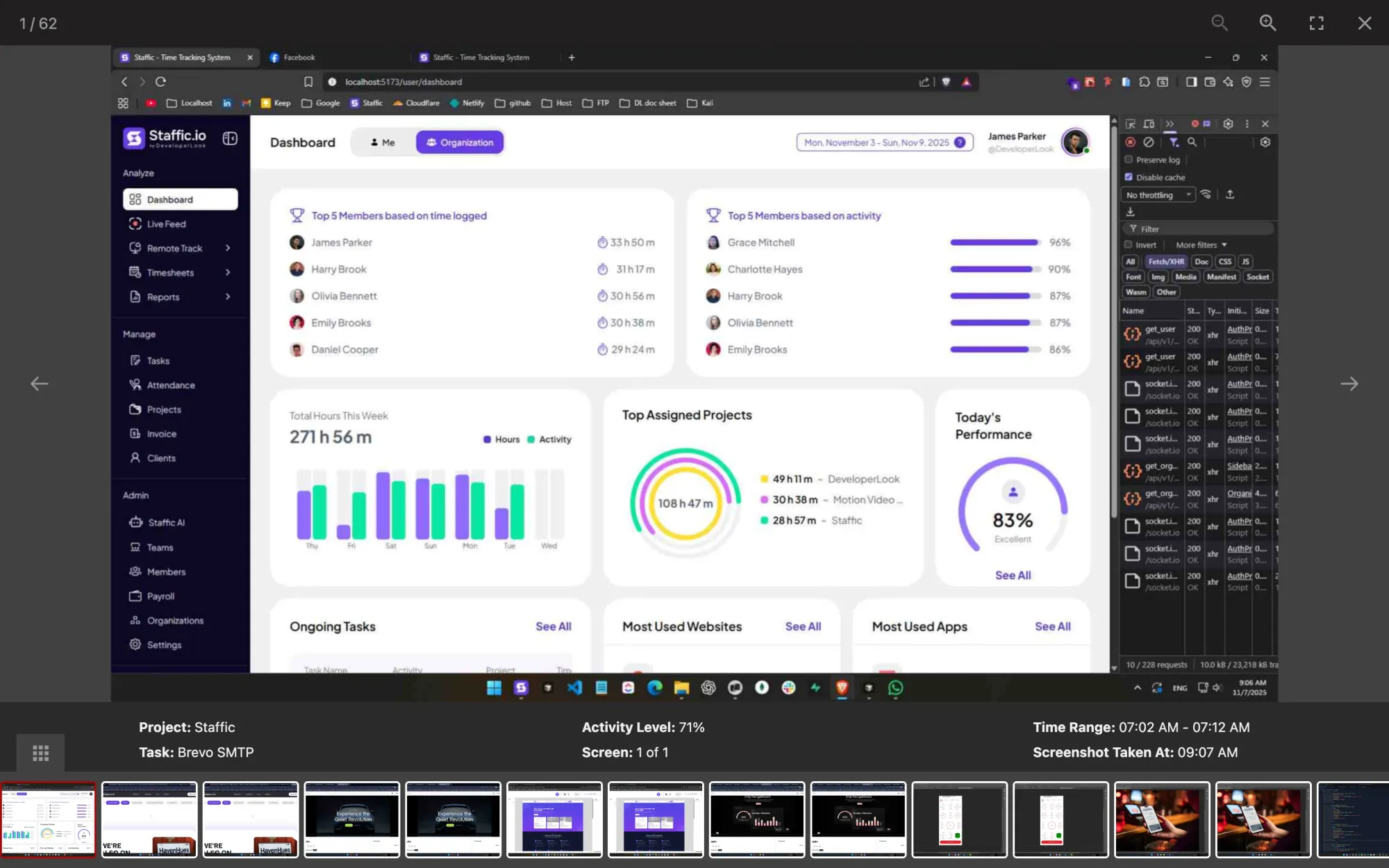
Staffic screenshot viewer: a capture for project Staffic, task Brevo SMTP, at 71% activity, 07:02 to 07:12 AM
A Staffic screenshot tagged with its project, task and 71% activity

FAQ

Staffic vs Insightful, answered.

Short answers to what teams ask before they switch.

Explore the live demo

What are the top alternatives to Insightful?

It depends on what you're missing. If you need payroll and client invoices from tracked time, Staffic has both on Elite, while Insightful lists them as coming soon. If you want a timer-based tracker with optional blur, Hubstaff says it can blur screenshots, apps and URLs. Both facts come from their own sites on October 12, 2026.

Is there a free Insightful alternative?

Yes. Staffic is free for up to 3 members, with time tracking on projects and tasks, keyboard and mouse activity levels, and apps and URLs. Insightful's pricing page lists no free plan; it offers a 7-day free trial with no credit card, checked on October 12, 2026.

How much does Insightful cost?

Insightful's Workforce Analytics plan is $8 per seat per month billed yearly, according to its pricing page on October 12, 2026. Workflow Optimization (in beta) is $12 and the Combo plan is $16, and screen recording and on-demand screenshots are $4 add-ons. Staffic Standard is $5.50 per user per month billed yearly ($1.00 during the current offer, until September 12, 2027).

Does Insightful include payroll?

Not yet. Insightful's plan table lists payroll and invoicing as coming soon, as of October 12, 2026. Staffic Elite pays members from tracked time, hourly, monthly or fixed, and adds clients and invoices.

Hubstaff vs Insightful: which one blurs screenshots?

Both can. Insightful blurs every screenshot by default, and Hubstaff offers an option to blur screenshots, apps and URLs. In an Insightful vs Hubstaff check on October 12, 2026, both sites also say they don't log keystrokes. Staffic has no blur setting: it shows screenshots as taken, only while the timer runs, and members see their own.

Does Insightful log keystrokes?

No. Insightful says it logs no keystrokes at any tier and captures no message content or audio. Staffic doesn't either: its desktop app records how active the keyboard and mouse were in each tracked session, as a percentage, not the keys pressed.

Does Insightful work on Linux?

Yes. Insightful lists Windows, macOS and Linux for its desktop app, as of October 12, 2026. Staffic also runs on all three: Windows 10 or later, macOS 12 Monterey or later, and Debian-based Linux with a .deb package.

Free for up to 3 members

An Insightful alternative with payroll built in.

Create a Staffic workspace, invite your team and see timesheets, activity levels and apps in one place.

  • No credit card
  • 7-day trial on paid plans
  • Windows, macOS, Linux


