

Skip to content
  1. Home
  2. Compare
  3. Clockify alternative

Clockify alternative

A Clockify alternative with monitoring built into the timer.

Staffic is a Clockify alternative for teams that want proof of work with their hours. Both track time on Windows, Mac and Linux. Clockify adds monitoring on Pro through a separate agent app; Staffic records activity levels in the desktop app that runs the timer, on every plan. Clockify facts come from its own website.

Last checked

Sources (7)

Quick verdict

Staffic or Clockify: the short answer.

The short answer

Choose Clockify if you mainly need timesheets, invoices and approvals at a low price per seat, or a free plan for up to 5 users. Choose Staffic if you want proof of work without a second app: activity levels on every plan and screenshots from Standard, recorded only while the timer runs. Members see their own screenshots too.

Choose Staffic if you want

  • Activity levels, apps and URLs recorded by the same desktop app as the timer
  • Keyboard and mouse activity on every plan, Free included
  • Members who can see their own screenshots
  • Payroll, client invoices and Staffic AI together on Elite

Best for remote teams that want proof of work in the app they already track time with.
Choose Clockify if you need

  • A free plan for up to 5 users
  • Invoicing, timesheet approval and time off from Standard, at $5.49 per seat
  • Screenshots blurred by default, taken every 30 to 1,800 seconds
  • A 7-day trial of every Pro feature

Best for teams that bill clients and may add monitoring later.

Feature by feature

Staffic vs Clockify, feature by feature.

19 rows in 5 topics. Every competitor fact links to its source.

Only differences
Staffic compared with Clockify
FeatureStafficFree for 3, then $5.50ClockifyFrom $3.99 per seat
Plans and price3 rows
Free planStafficUp to 3 members, no time limitClockifyUp to 5 users, unlimited tracking1
Lowest paid plan, billed yearlyStafficStandard, $5.50 per user ($1.00 during the current offer)ClockifyBasic, $3.99 per seat ($4.99 monthly)1
Lowest plan with screenshots, billed yearlyStafficStandard, $5.50 per userClockifyPro, $7.99 per seat ($9.99 monthly)13
Time tracking4 rows
Desktop appsStafficWindows, macOS and LinuxClockifyWindows, Mac and Linux5
Idle detectionStafficIdle after 50 seconds without inputClockifyEvery plan, with reminders1
Timesheet approvalStafficEliteClockifyStandard and up1
Time offStafficBalances on Standard; requests and approval on EliteClockifyStandard and up1
Monitoring7 rows
Where monitoring runsStafficIn the desktop app that runs the timerClockifyA separate agent app on company devices, Pro and up24
When it recordsStafficOnly while the timer runsClockifyWhile the device is active2
Keyboard and mouse activityStafficEvery planClockifyPro and up2
Apps and websites, seen by adminsStafficEvery plan, per tracked sessionClockifyPro and up, through the agent app2
ScreenshotsStafficStandard and Elite: 2 per 10 minutes; 1, 2 or 3 on EliteClockifyPro and up: every 30 to 1,800 seconds, blurred by default3
Members see their own monitoring dataStafficMembers see their own screenshotsClockifyNo; admins view the results2
Screen recordingsStafficElite (beta)ClockifyNot listed1
Billing and payroll3 rows
Billable ratesStafficProject billing on Standard; member bill rates on EliteClockifyBasic and up1
Client invoicesStafficEliteClockifyStandard and up1
PayrollStafficElite: pay from time worked, salary or fixed amountsClockifyEarnings from hours; payroll runs in other apps6
AI2 rows
MCP server for AI assistantsStafficEvery planClockifyNot listed1
AI assistantStafficStaffic AI on EliteClockifyNot listed1
IncludedOn a higher planNot available, or not listedSource, listed at the end of the pageShowing 19 of 19 rows
How we compare

We read each company’s public pricing, download and help pages and note the date we checked each one. “Not listed” means the pricing page did not mention the feature on that date. Staffic prices come from the Staffic plans API, the same source as the Staffic pricing page.

Key differences

Where Staffic and Clockify really differ.

Four differences that change which tool fits. Pick one to read it and see it in Staffic.

Clockify's activity monitoring starts on Pro and runs in an agent app you install on company devices, active whenever the device is. Staffic records activity levels, apps, URLs and screenshots in the desktop app members already use to start the timer, and only while it runs.

Staffic
Same app as the timer, only while it runs
Clockify
Agent app on Pro, active with the device
How Staffic tracks employee time

In Clockify, employees can't access their own monitoring results: admins view them. In Staffic, members see their own screenshots, and admins set what is recorded (screenshots, apps, URLs, keyboard and mouse) under Settings, Activity.

Staffic
Members see their own screenshots
Clockify
Admins only
How Staffic screenshots work

Clockify Basic is $3.99 per seat billed yearly, but activity monitoring and screenshots need Pro, at $7.99 billed yearly or $9.99 monthly. Staffic records keyboard and mouse activity free for up to 3 members and adds screenshots on Standard, at $5.50 per user billed yearly.

Staffic
Activity free, screenshots on Standard
Clockify
Monitoring from Pro, $7.99
Compare Staffic plans

Clockify calculates earnings from tracked hours and leaves payroll to other apps, and its invoicing starts on Standard at $5.49 per seat. On Staffic Elite, payroll lists each member's time worked next to their pay rate or monthly salary, and you mark each payment as paid. Clients and invoices sit on the same plan, and Staffic records payments without moving money.

Staffic
Payroll and invoices on Elite
Clockify
Earnings exported; invoices on Standard
How Staffic payroll works
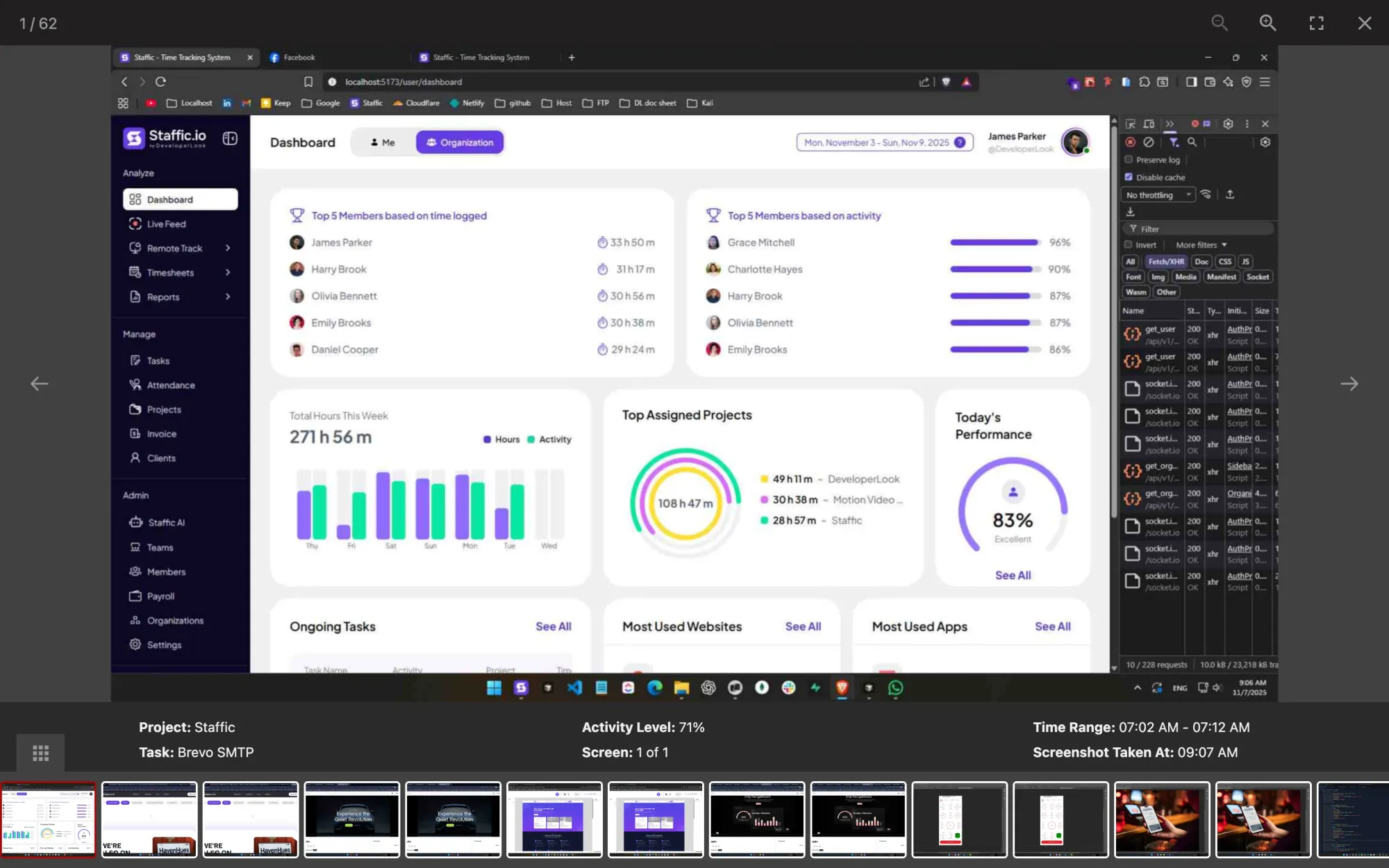
Staffic screenshot viewer: a capture for project Staffic, task Brevo SMTP, at 71% activity, 07:02 to 07:12 AM
One screenshot with its project, task and activity level, in Staffic

FAQ

Staffic vs Clockify, answered.

Short answers to what teams ask before they switch.

Explore the live demo

What are the best Clockify alternatives?

It depends on what Clockify doesn't cover for your team. If you want proof of work in the app that runs the timer, Staffic records keyboard and mouse activity on every plan and screenshots from Standard. If hours and invoices are all you need, see how Clockify compares with Toggl on our Clockify vs Toggl page.

Why do teams outgrow Clockify?

A team outgrows Clockify when it needs proof of work as well as hours. In Clockify that means Pro at $7.99 per seat billed yearly and a separate agent app. Employees also can't see their own monitoring results, according to Clockify's site on October 12, 2026. In Staffic, the app that runs the timer records activity, and members see their own screenshots.

How does Staffic compare to Clockify on features?

Both track time on Windows, Mac and Linux, with idle detection, timesheet approval and time off. Clockify puts approvals, time off and invoicing on Standard and monitoring on Pro. Staffic includes keyboard and mouse activity, apps and URLs and an MCP server on every plan, screenshots on Standard, and approvals, payroll and invoices on Elite.

Which time tracker has screenshots and activity monitoring built in?

Staffic does: its desktop app for Windows, macOS and Linux records keyboard and mouse activity on every plan and screenshots from Standard, only while the timer runs. Clockify's monitoring needs Pro and an agent app on company devices, and its setup guide covers Windows and Mac, according to Clockify's help center on October 12, 2026.

Can I move from Clockify to Staffic?

Yes. Set up your Clockify projects and tasks in a free Staffic workspace first, so members can pick them on day one. Then invite the team; each member installs the desktop app for Windows, macOS or Linux. Staffic records from each member's first timer, so keep your Clockify reports for earlier hours.

Which tool suits agencies and remote teams best?

For agencies that mainly bill by the hour, Clockify's Standard plan includes invoicing and approvals at $5.49 per seat billed yearly. For remote teams that want proof of work, Staffic records activity levels, apps and URLs on every plan and adds screenshots on Standard. Teams that need both can use Staffic Elite for invoices and payroll.

What are the best TimeCamp alternatives?

If you're leaving TimeCamp for monitoring, pick a tool that includes it on a lower plan. TimeCamp's Free plan has unlimited users. Its pricing page on October 12, 2026 puts app and website tracking on Premium, and screenshots and timesheet approvals on Ultimate. On TimeCamp vs Clockify, Clockify puts screenshots on Pro. Staffic records apps and URLs on every plan and screenshots from Standard.

Free for up to 3 members

See the work, not just the hours.

Create your workspace, invite your team, and the first timesheet builds itself.

  • No credit card
  • 7-day trial on paid plans
  • Windows, macOS, Linux


