Work you can’t see
Nobody walks past a remote desk. When a deliverable slips, you have the hours someone logged and no idea what filled them.
See step 3: Context from activity, apps and URLs
Features
All 33 featuresSee the work while it happens.
 DashboardYour team's week at a glance, Monday to Sunday
 Live FeedEliteSee who's tracking time right now, and on what
 ScreenshotsStandardVisual proof of work, captured automatically
 AppsWhich apps each tracked session used
 URLsThe websites behind the tracked time
 Screen RecordingsEliteFull session video, beyond a screenshot
01 / 33
Dashboard
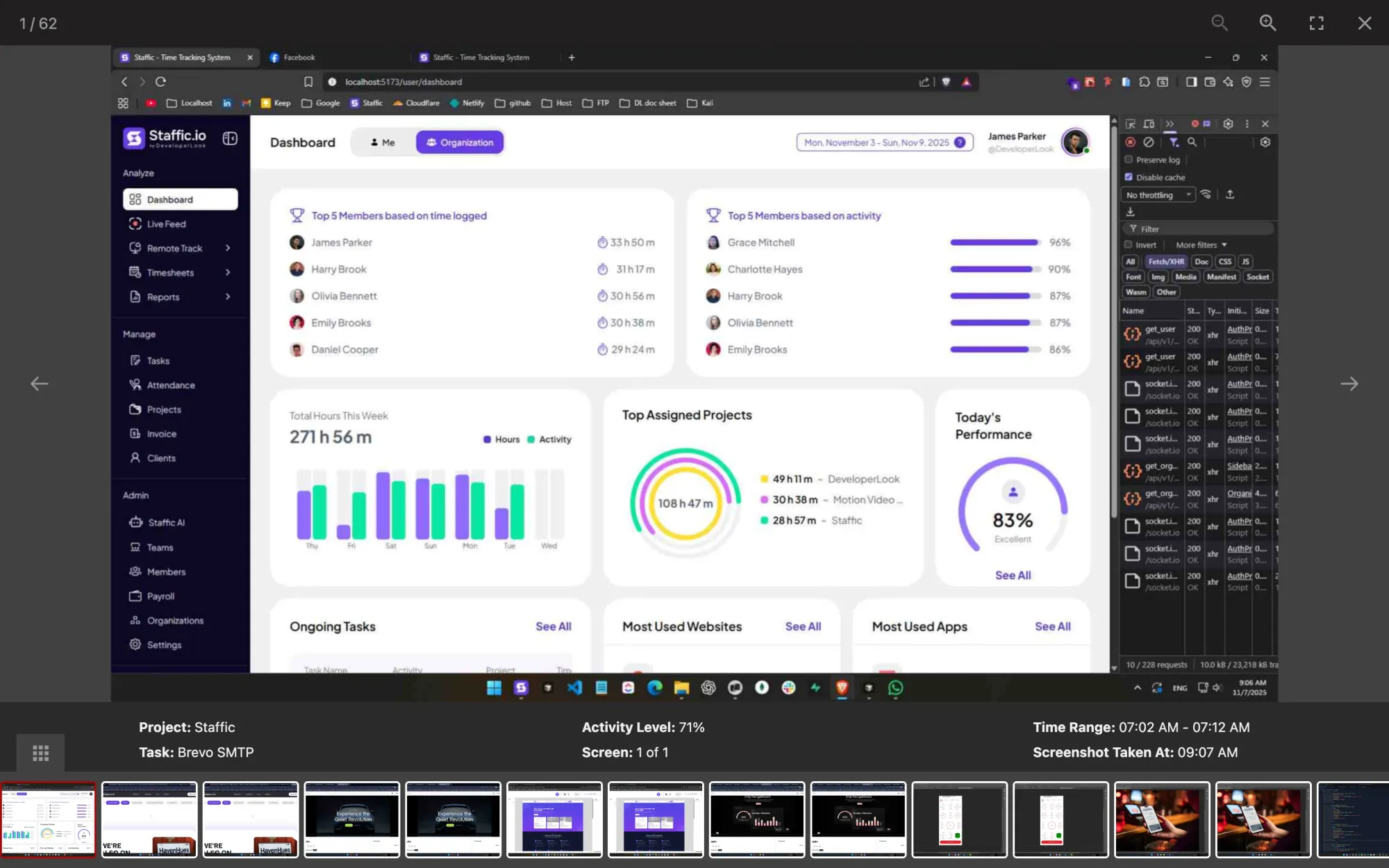
The team dashboard: this week's hours, today's performance, top members, ongoing tasks, top projects and the most used apps and websites.
View DashboardRemote employee monitoring software
Staffic is remote employee monitoring software that records screenshots, activity levels, apps and websites only while a member’s timer runs. You choose what to record on one settings page, members see their own records, and on Elite, Live Feed shows admins who is working right now.
Remote monitoring challenges
Four problems that come up when a team picks remote worker monitoring software.
Nobody walks past a remote desk. When a deliverable slips, you have the hours someone logged and no idea what filled them.
See step 3: Context from activity, apps and URLsYour team hears the word monitoring and expects the worst. Without written rules on what is recorded and when, trust drops before the first report.
See step 1: Choose what to record, then tell your teamA screenshot on its own says little. You need the project, the task and the activity level next to it to judge an hour fairly.
See step 2: Screenshots only during tracked timeMessages go unanswered and you can’t tell whether someone is on a task, on a break or done for the day.
See step 4: See who is working nowHow Staffic helps
Four steps, from choosing what to record to seeing who is working now. Each step links to the feature behind it.
Step 1 of 4
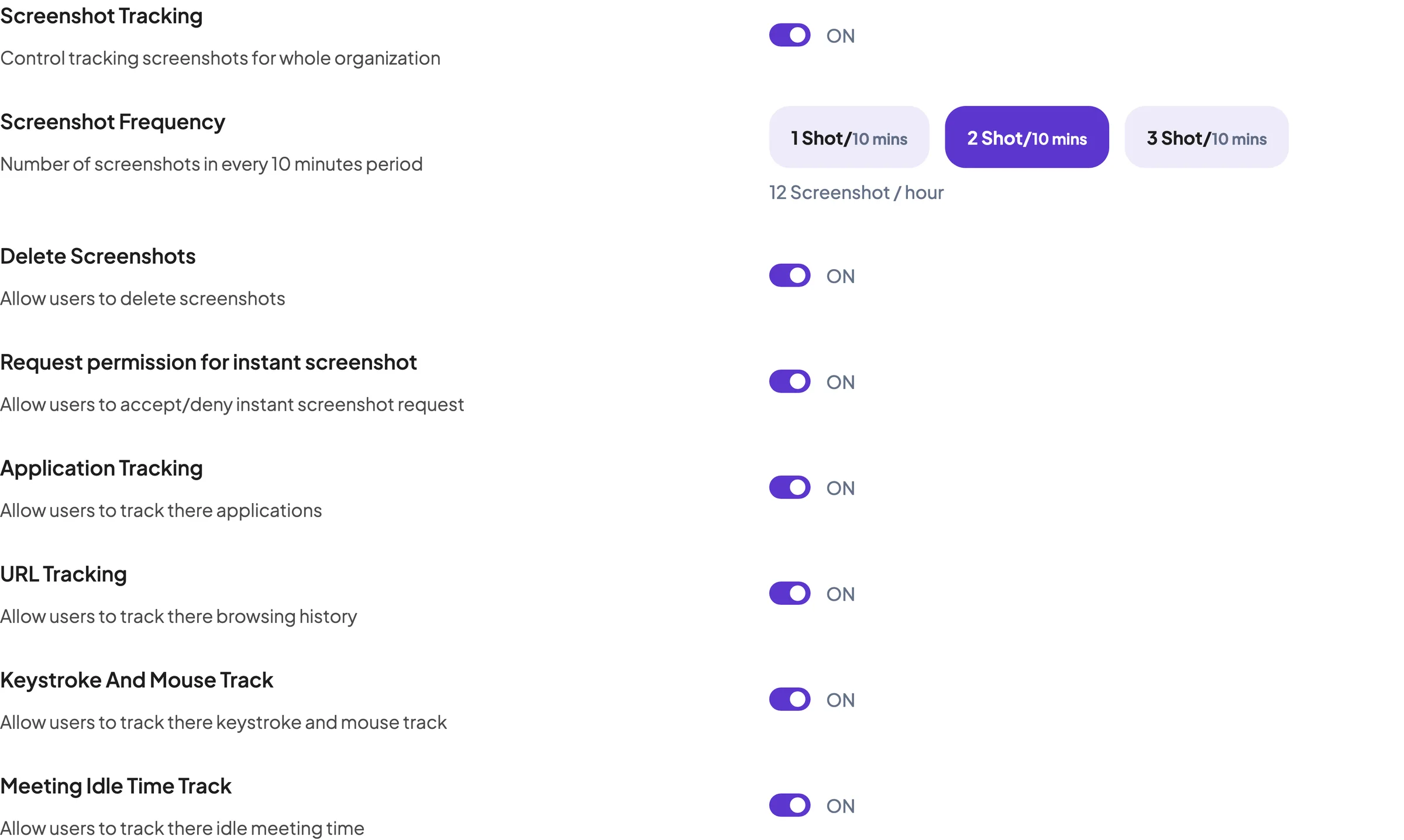
In Settings > Activity, an admin turns screenshot tracking (Standard and Elite), app tracking, URL tracking and keyboard and mouse tracking on or off for the whole organization. Write those choices into a short policy and share it before anyone installs the desktop app.
Fixes: Monitoring that feels like spying
Step 2 of 4
Screenshots are taken only while a member’s timer runs: 2 per 10 minutes on Standard, and 1, 2 or 3 on Elite. Each one shows its project, task and activity level, and Staffic keeps them for 365 days.
Fixes: Screenshots without context
Step 3 of 4
The desktop app turns keyboard and mouse use into an activity level and lists the apps and websites used in each tracked session. Staffic stores the activity percentage, not what anyone typed. On Standard and Elite, the Apps and URLs usage report adds up that time per member and day.
Fixes: Work you can’t see
Step 4 of 4
On Elite, Live Feed shows admins who is tracking right now and on which project and task. Admins can also request an instant screenshot from a member who is tracking, and you can let members accept or deny each request.
Fixes: Who is working right now?
Recommended plan
Screenshots start on Standard. Live Feed, instant screenshots and the screenshot frequency setting need Elite. Set your team size to compare.
Your team needs
Billing
Standard
$1.00per user per month, billed yearly
Offer price until September 12, 2027. List price $5.50.
$15.00 a month for 15 members, $180.00 a year.
More than 3 members, and no invoices, payroll or recordings: Standard covers the rest.
Customer stories
Staffic.io brings transparency without micromanagement. Our team feels trusted, and productivity has never been higher. The balance between oversight and autonomy is perfect for building strong remote culture.
Staffic.io transformed how we track productivity. Our remote team is now more accountable and transparent than ever. The detailed reports and activity monitoring have been game-changing for us.
FAQ
What managers and employees ask before monitoring starts. Answers checked against the Staffic app.
Explore the live demoRemote employee monitoring is recording how remote staff spend their working time, with tools such as screenshots, activity levels and app and website logs. In Staffic, that record is made only while a member’s timer runs and sits next to the hours on each project and task.
Agree on what you will record, write it down and share it, then let each member track time in the Staffic desktop app. An admin picks screenshot, app, URL and keyboard and mouse tracking in Settings > Activity, and the records appear by member, day and task. Remote work monitoring software works best when the team knows the rules from day one.
Monitor the work computer during tracked time, not the home. Staffic’s work from home monitoring software records only while the member’s timer runs on Windows, macOS or Linux. Tracking stops after 5 minutes without input or when the computer sleeps or locks, and nothing is captured after the member stops the timer for the day.
Look at activity and output together, not one number. Staffic gives each tracked hour an activity level from keyboard and mouse use and lists the apps and websites used. On Standard and Elite, the Time and Activity and Performance reports compare members over any dates. As remote employee productivity monitoring software, it shows how time was spent; whether the work was good is still your call.
Choose one that records the same way on office and home days and that your team can see. Compare remote employee monitoring tools on what they capture, when they capture it, who can see the records and how long they are kept. Staffic captures only during tracked time, shows members their own records and keeps screenshots for 365 days.
Yes. Members see their own screenshots, apps, URLs and timesheets in the Staffic web app, and admins see the whole team. On Standard and Elite you can let members delete their own screenshots, and on Elite you can let them accept or deny each instant screenshot request.
Staffic is free for up to 3 members. Standard is $5.50 per user per month billed yearly ($1.00 during the current offer), or $7.50 monthly, and Elite, which adds clients, invoices, payroll and screen recordings, is $5.80 billed yearly.
Free for up to 3 members
Choose what to record in Settings, share it with your team, then invite them to install the desktop app.




