One tool per company
Each subsidiary or business unit runs its own tool, so leaders log in to several places and still can’t compare the hours.
See step 1: Run several organizations
Features
All 33 featuresSee the work while it happens.
 DashboardYour team's week at a glance, Monday to Sunday
 Live FeedEliteSee who's tracking time right now, and on what
 ScreenshotsStandardVisual proof of work, captured automatically
 AppsWhich apps each tracked session used
 URLsThe websites behind the tracked time
 Screen RecordingsEliteFull session video, beyond a screenshot
01 / 33
Dashboard
The team dashboard: this week's hours, today's performance, top members, ongoing tasks, top projects and the most used apps and websites.
View DashboardEnterprise time tracking software
Staffic is enterprise time tracking software for organizations with many teams. Run several companies from one account, give each admin and manager the access their role needs, and approve timesheets before payroll on Elite. Ask Staffic AI about the hours, or connect your own AI tools through the MCP server.
Enterprise challenges
Four problems that show up once a company has many teams, managers and entities.
Each subsidiary or business unit runs its own tool, so leaders log in to several places and still can’t compare the hours.
See step 1: Run several organizationsWithout roles, a department head either gets full admin rights or asks an admin every time they need a report.
See step 2: Give each role the right accessTeam leads look after their own people, but the tool only knows admins and members, so every request goes up the chain.
See step 3: Let team managers run their teamsWhen nobody signs off the hours, mistakes surface in payroll, where they cost the most to fix.
See step 4: Approve hours before payrollHow Staffic helps
From the company structure to the data your systems read. Each step links to the feature behind it.
Step 1 of 5
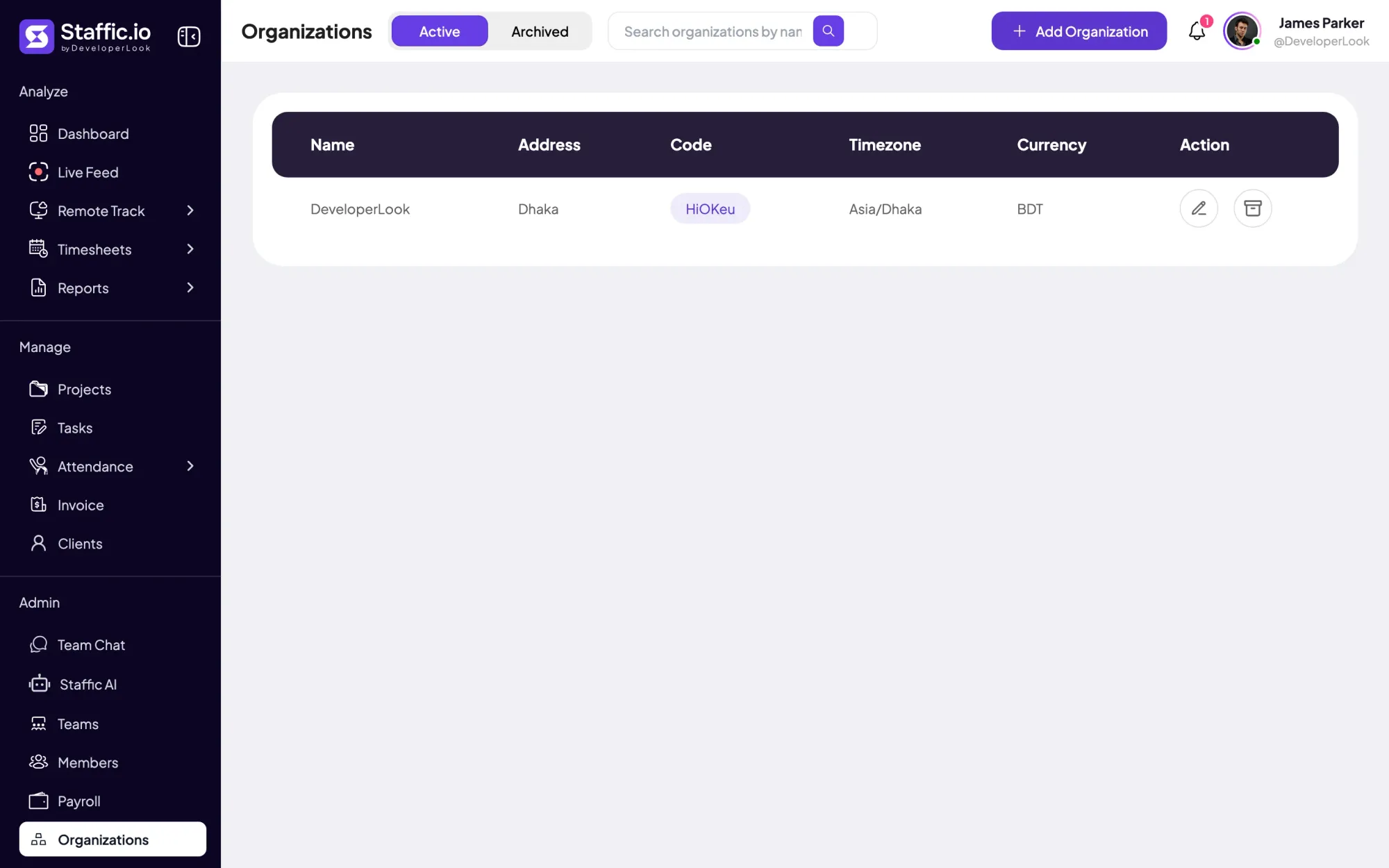
Create an organization for each company or business unit, each with its own code, timezone, currency, members and data. Switch between them from one Staffic account.
Fixes: One tool per company
Step 2 of 5
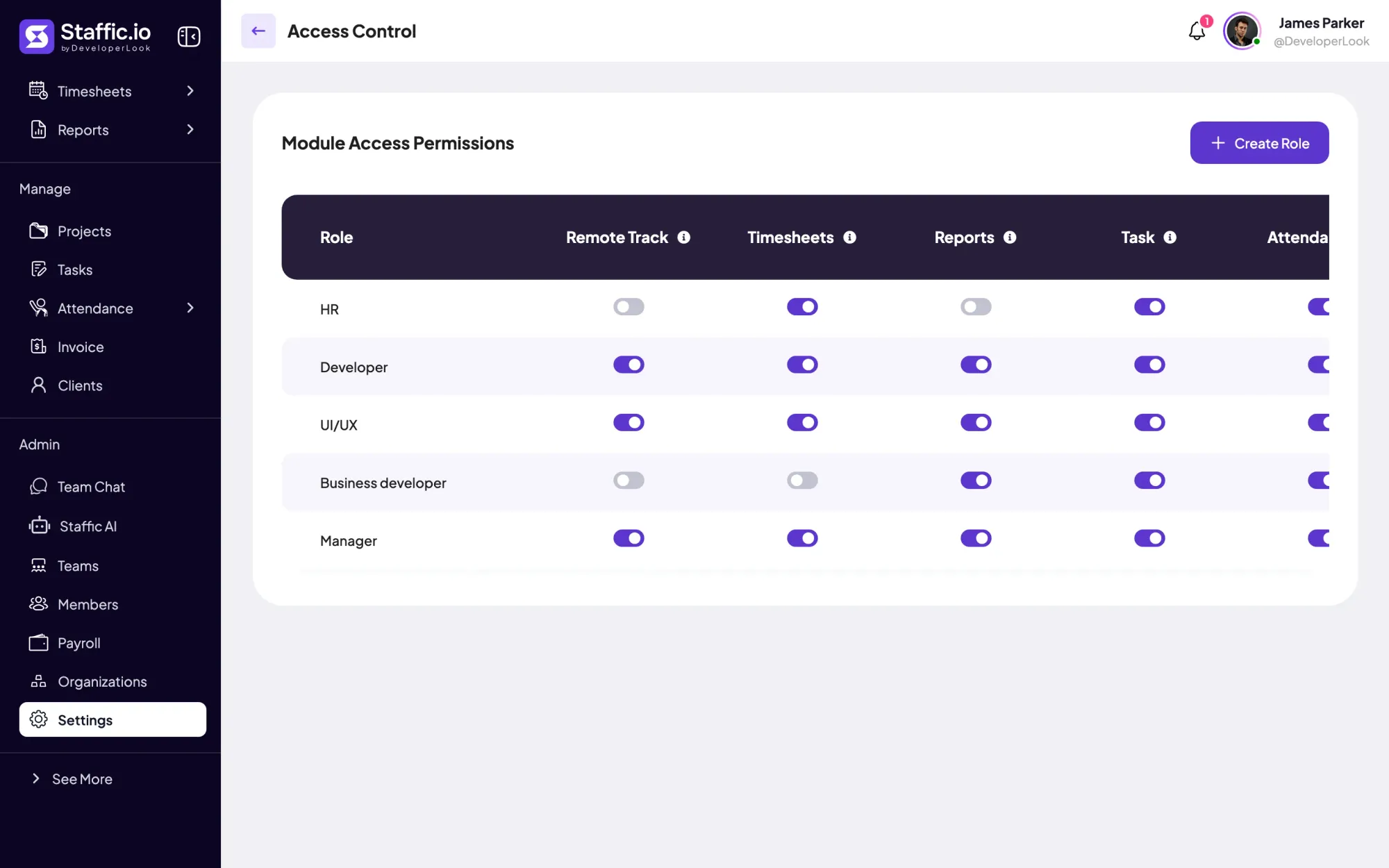
On every plan, Settings > Access Control lets you build roles that grant modules such as Timesheets, Reports or Members, and give each member a role on their member page. Extra admins are on Standard and Elite. Members without a role see their own data.
Fixes: Full admin or nothing
Step 3 of 5
Group people into teams on Standard or Elite. On Elite, make team managers, change settings for one member at a time and filter timesheets and reports by several members at once.
Fixes: Team leads without their own view
Step 4 of 5
On Elite, turn on Timesheet Approval for the members who need it and accept each day’s timesheet before the hours go to Payroll. Payroll turns tracked hours and pay rates into payment-ready data.
Fixes: Hours reach payroll unchecked
Step 5 of 5
On Elite, Staffic AI answers questions about hours, app usage and clock-ins in chat. On every plan, the MCP server lets Claude, Cursor and other MCP clients read timesheets, activity and projects with a read only or read and write key you control.
Recommended plan
Team managers, timesheet approval, per-member settings, Staffic AI and Payroll need Elite. Set your team size to see what you would pay.
Your team needs
Billing
Elite
$5.80per user per month, billed yearly
$290.00 a month for 50 members, $3,480.00 a year.
Elite adds the payroll you picked.
Customer stories
Staffic.io transformed how we track productivity. Our remote team is now more accountable and transparent than ever. The detailed reports and activity monitoring have been game-changing for us.
FAQ
What larger organizations ask before they roll out time tracking.
Explore the live demoEnterprise time tracking software records hours across many teams and gives each level of the company the access it needs. Staffic adds separate organizations per company, roles that grant modules, team managers and timesheet approval to the same desktop time tracking a small team uses.
Yes. An admin can create several organizations, each with its own code, timezone, currency, members, settings and plan, and switch between them from one account. Data stays inside its organization.
Each organization has admins and members, and extra admins are on Standard and Elite. On every plan, Settings > Access Control lets you build roles that grant modules such as Timesheets, Reports, Members or Teams. A member without a role sees only their own data.
Yes, within tracked time. Apps and websites are tracked on every plan, screenshots on Standard and Elite, and screen recordings and Live Feed on Elite. Admins choose which of these are on and can turn tracking off for a member.
Yes, on Elite. Admins change settings for one member at a time, such as timesheet approval and tracking options, while the organization defaults apply to everyone else. Turning tracking on or off per member is on Standard and Elite.
Check five things: separate organizations or business units, roles below full admin, managers who own their teams, approval before hours reach payroll, and a way for your other tools to read the data. Staffic covers all five, the last through its MCP server. Ask every vendor which plan each one needs.
Staffic is free for up to 3 members. Standard is $5.50 per user per month billed yearly ($1.00 during the current offer), or $7.50 monthly, and Elite, which adds clients, invoices, payroll and screen recordings, is $5.80 billed yearly.
Free for up to 3 members
Create the organization, add your admins and invite the first team. Add more organizations when you need them.




