Two sets of records
Office days go on a sign-in sheet and home days in a time tracker. At month end, someone merges the two by hand.
See step 1: Track time the same way everywhere
Features
All 33 featuresSee the work while it happens.
 DashboardYour team's week at a glance, Monday to Sunday
 Live FeedEliteSee who's tracking time right now, and on what
 ScreenshotsStandardVisual proof of work, captured automatically
 AppsWhich apps each tracked session used
 URLsThe websites behind the tracked time
 Screen RecordingsEliteFull session video, beyond a screenshot
01 / 33
Dashboard
The team dashboard: this week's hours, today's performance, top members, ongoing tasks, top projects and the most used apps and websites.
View DashboardHybrid work software
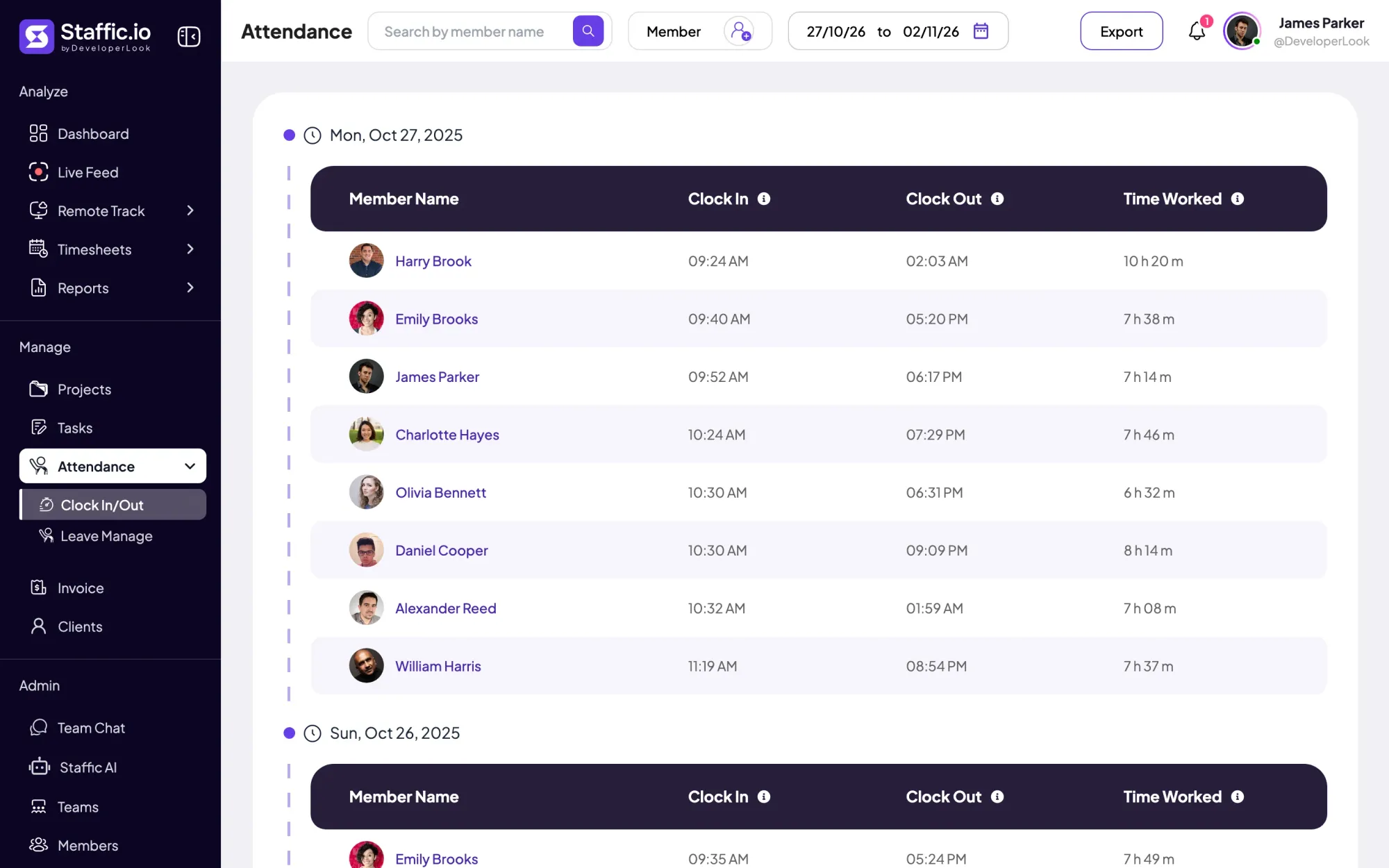
Staffic is hybrid work software that keeps the same records on office days and home days. Time on tasks comes from the desktop app, attendance from each day’s first and last tracked session, and leave and approvals sit next to them. Nobody keeps a second sign-in sheet.
Hybrid team challenges
Four problems hybrid teams hit before they choose hybrid workplace software.
Office days go on a sign-in sheet and home days in a time tracker. At month end, someone merges the two by hand.
See step 1: Track time the same way everywhereSome people are at their desks, some at home and some off. Without one attendance view, you ask around every morning.
See step 2: Attendance from tracked timeDays off are agreed in chat and written down later, if at all. Balances drift and payroll finds out last.
See step 3: Leave in the same appThe people you see in the office look busier than the ones at home. You need the same record for both before you compare anyone.
See step 4: Review the month, then approve itHow Staffic helps
Four steps that work the same at a desk in the office or at home. Each step links to the feature behind it.
Step 1 of 4
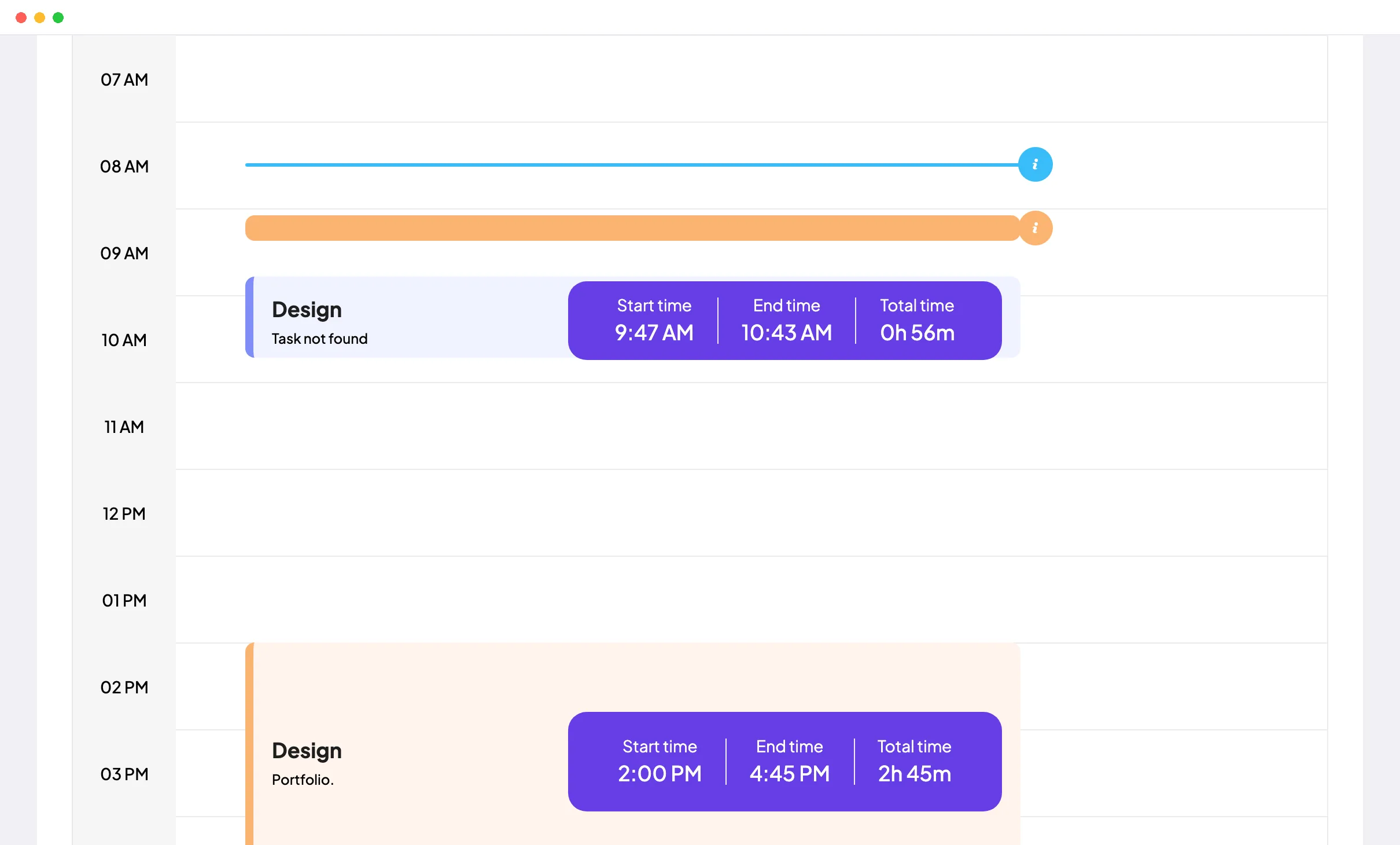
Members start the Staffic desktop app on Windows, macOS or Linux and track time against a project and task, at the office or at home. Daily, weekly and bi-weekly timesheets fill in from that time on every plan.
Fixes: Two sets of records
Step 2 of 4
On Standard and Elite, Clock In/Out takes each person’s first and last tracked session of the day as their clock-in and clock-out. It works the same on office and home days, and you can filter it by member and export it as PDF or Excel.
Fixes: Who is working today?
Step 3 of 4
Each member’s leave balance sits on their profile on Standard and Elite. On Elite, members apply for leave in Staffic and a manager approves or rejects it from one list.
Fixes: Leave in a spreadsheet
Step 4 of 4
On Standard and Elite, the Monthly Timesheet shows one member’s hours on a calendar, so office weeks and home weeks sit side by side. On Elite, Timesheet Approval lets a manager accept each day before payroll.
Fixes: Office presence mistaken for work
Recommended plan
Clock In/Out, leave balances and monthly timesheets need Standard. Leave requests and timesheet approval need Elite. Set your team size to compare.
Your team needs
Billing
Standard
$1.00per user per month, billed yearly
Offer price until September 12, 2027. List price $5.50.
$25.00 a month for 25 members, $300.00 a year.
More than 3 members, and no invoices, payroll or recordings: Standard covers the rest.
FAQ
What managers ask before they put office and home days on one record.
Explore the live demoHybrid work software keeps one record of work for people who split their week between the office and home. Staffic does it with time tracking on projects and tasks, attendance taken from tracked time, leave and approvable timesheets, the same on either kind of day. It is hybrid work management software for hours and attendance, not for booking desks.
Use one tracker for both places. Members start the Staffic desktop app timer on a project and task wherever they work, and the same timesheets, activity levels and Clock In/Out record follow them. So yes, hybrid working software like Staffic includes time tracking, on every plan, with attendance on Standard and Elite.
Not by place, because Staffic records the same things on every day without marking it as an office or home day. You can compare people and periods instead. The Monthly Timesheet shows each day’s hours, and on Standard and Elite the Time and Activity Report gives hours and activity for any dates, so you can set known office days beside home days.
Take attendance from the work itself. On Standard and Elite, Clock In/Out records each person’s first and last tracked session of the day, at home or in the office, and exports to PDF or Excel. Leave balances sit on each member’s profile, and leave requests with approval are on Elite.
Hold everyone to the same record, wherever they sit. Office and home days both show up as tracked time on tasks, so every day is judged on the same timesheet. On Elite, Timesheet Approval makes a manager check each day’s hours before payroll.
Tell the team what Staffic records, when and who can see it before anyone installs the app. Recording happens only while a member’s timer runs, members see their own timesheets, and admins choose screenshot, app and URL tracking in Settings > Activity. Start with time and attendance, and add screenshots only if you need them.
Staffic is free for up to 3 members. Standard is $5.50 per user per month billed yearly ($1.00 during the current offer), or $7.50 monthly, and Elite, which adds clients, invoices, payroll and screen recordings, is $5.80 billed yearly.
Free for up to 3 members
Install the desktop app on Windows, macOS or Linux, invite your team and see the first week of attendance.




