Timesheets filled in from memory
Stopping to log hours breaks a developer’s focus, so the week gets reconstructed on Friday and the numbers are guesses.
See step 1: Track time on the task you pick up
Features
All 33 featuresSee the work while it happens.
 DashboardYour team's week at a glance, Monday to Sunday
 Live FeedEliteSee who's tracking time right now, and on what
 ScreenshotsStandardVisual proof of work, captured automatically
 AppsWhich apps each tracked session used
 URLsThe websites behind the tracked time
 Screen RecordingsEliteFull session video, beyond a screenshot
01 / 33
Dashboard
The team dashboard: this week's hours, today's performance, top members, ongoing tasks, top projects and the most used apps and websites.
View DashboardTime tracking software for engineers
Staffic is time tracking software for engineers: developers time each task from the desktop app, and apps and URLs show where the hours went. The MCP server lets Claude, Cursor and other AI agents work with your tasks and timesheets. Free for up to 3 members.
Software team challenges
Four reasons developer time is hard to account for.
Stopping to log hours breaks a developer’s focus, so the week gets reconstructed on Friday and the numbers are guesses.
See step 1: Track time on the task you pick upA task sized at a day takes three. Without actual hours next to the estimate, the next estimate is just as far off.
See step 2: See estimates next to actualsA contractor team bills a full week. You can see the commits, but not where the rest of the hours went.
See step 3: Check remote and outsourced hoursHours live in one tool and the code in another, so a question like how long the auth refactor took means a trip to a report screen.
See step 4: Ask from Claude or CursorHow Staffic helps
From picking up a task to billing the client. Each step links to the feature behind it.
Step 1 of 5
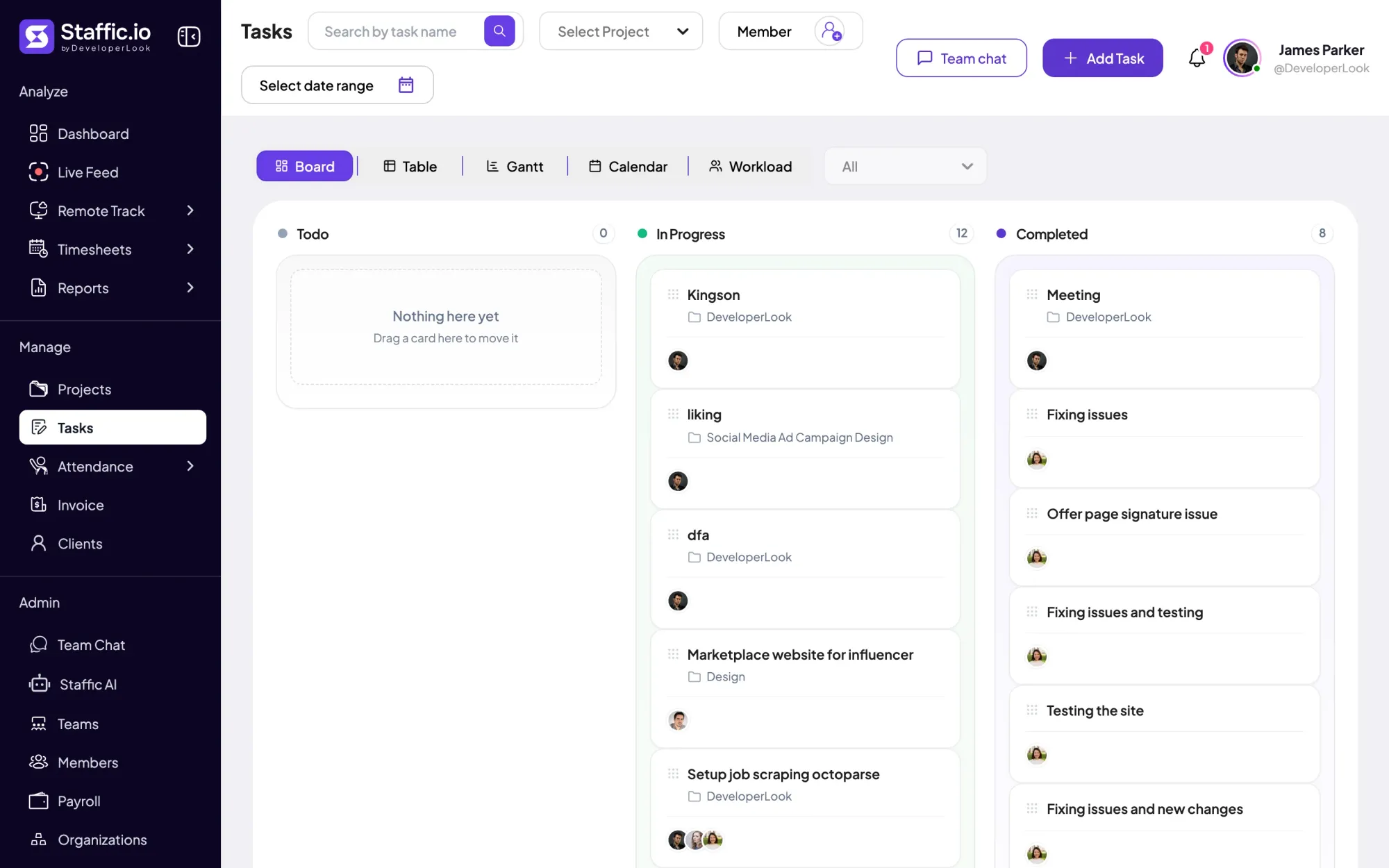
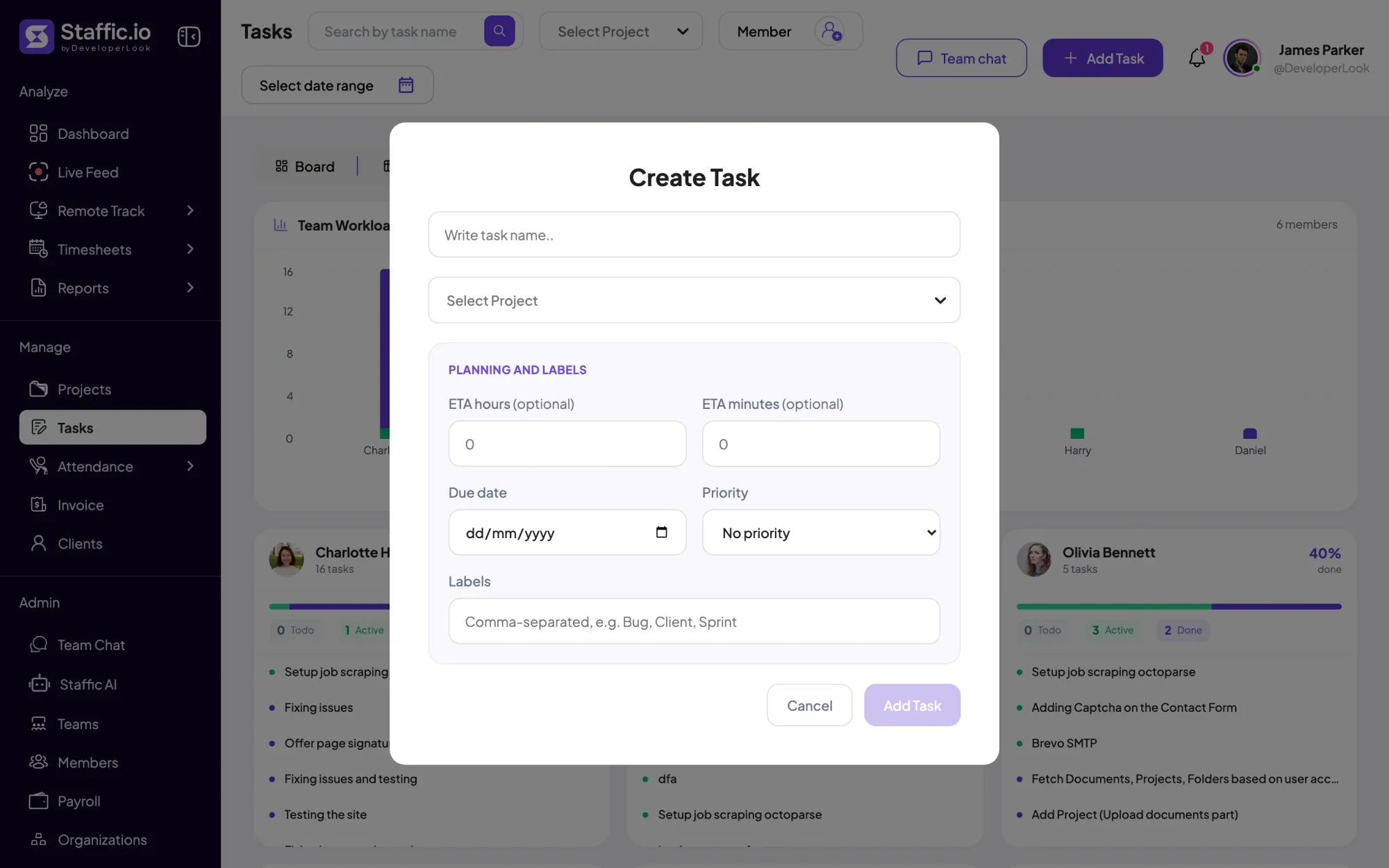
Create tasks in each project with an estimate, due date, priority and labels such as Bug or Sprint. Developers start the desktop timer on Windows, macOS or Linux against the task they’re on, and Board, Table, Gantt and Calendar views show where the sprint stands.
Fixes: Timesheets filled in from memory
Step 2 of 5
Each task shows its estimate next to the time worked, and the team can ask for an ETA extension, with a reason, when the work grows. On Standard and Elite, the Performance report totals estimated and worked time per developer.
Fixes: Estimates that never meet reality
Step 3 of 5
During each tracked session, Staffic records keyboard and mouse activity levels. When you turn them on, it also logs the apps and sites in use, such as Cursor, Slack or github.com. On Standard and Elite, screenshots add a picture of the work behind the hours an outsourced team bills.
Fixes: Outsourced hours you can’t check
Step 4 of 5
An admin creates an MCP key in Settings, read only or read and write, and connects Claude, Cursor, Codex, Google Antigravity or another MCP client. The agent reads timesheets and reports, and with a read and write key it can create or update tasks, without anyone leaving the editor.
Fixes: One more dashboard to open
Recommended plan
As engineering time tracking software, Staffic starts free: tasks, apps and URLs tracking and the MCP server are on every plan. The Performance report, screenshots and billing rates need Standard, and client invoices need Elite.
Your team needs
Billing
Standard
$1.00per user per month, billed yearly
Offer price until September 12, 2027. List price $5.50.
$10.00 a month for 10 members, $120.00 a year.
More than 3 members, and no invoices, payroll or recordings: Standard covers the rest.
Customer stories
Staffic.io's live feed lets me check in without interrupting my team. Remote management finally feels natural. I can see progress in real-time without constant meetings or status updates that drain productivity.
FAQ
What engineering leads ask before they put a timer on the team.
Explore the live demoDevelopers start the Staffic desktop timer on a project and task when they pick up work, and stop it when they’re done. The hours land in daily, weekly and bi-weekly timesheets on every plan, so Staffic works as developer time tracking software and nobody rebuilds the week from commit history.
Create each ticket as a task in Staffic with an estimate, a due date and labels such as Sprint or Bug. Developers track time against the task, and its page shows the estimate next to the time worked. Board, Table, Gantt and Calendar views let a lead follow the sprint, which makes Staffic useful as time tracking software for project managers too.
Check what was recorded during those hours. While the timer runs, Staffic records keyboard and mouse activity levels and, if you turn them on, apps and URLs. On Standard and Elite it also takes screenshots, 2 per 10 minutes by default. Outsourced developers join your organization as members, so their hours sit next to your in-house team’s.
It shouldn’t, because the recording runs in the background. Once a developer starts the timer on a task, the desktop app records without further input until they switch tasks or stop. After 5 minutes without keyboard or mouse input, tracking stops on its own. Teams that work in Claude or Cursor can ask about hours through the MCP server instead of opening a report.
Set the project’s billing on Standard or Elite: one hourly rate, a rate per developer or a fixed fee. The project page then shows the billable amount from tracked hours. On Elite, link the project to an invoice line to bill the client what hasn’t been invoiced yet.
Yes. Designers and developers track time in the same projects and tasks, so a feature’s design and build hours sit side by side in one timesheet. Staffic works as time tracking software for designers too, and the URLs view lists sites such as figma.com next to github.com when URL tracking is on.
Staffic is free for up to 3 members. Standard is $5.50 per user per month billed yearly ($1.00 during the current offer), or $7.50 monthly, and Elite, which adds clients, invoices, payroll and screen recordings, is $5.80 billed yearly.
Free for up to 3 members
Create a project, add the sprint’s tasks and invite your developers. Free for up to 3 members.




