Time cards filled in from memory
Hours get written down at the end of the day, or the end of the week, and the gaps are filled in from memory.
See step 1: Track time on real work
Features
All 33 featuresSee the work while it happens.
 DashboardYour team's week at a glance, Monday to Sunday
 Live FeedEliteSee who's tracking time right now, and on what
 ScreenshotsStandardVisual proof of work, captured automatically
 AppsWhich apps each tracked session used
 URLsThe websites behind the tracked time
 Screen RecordingsEliteFull session video, beyond a screenshot
01 / 33
Dashboard
The team dashboard: this week's hours, today's performance, top members, ongoing tasks, top projects and the most used apps and websites.
View DashboardTimekeeping software for small business
Staffic is timekeeping software for small business: your team tracks time on projects from the desktop app, and the hours land in daily, weekly and bi-weekly timesheets. Clock In/Out joins on Standard and Payroll on Elite. Free for up to 3 members.
Small business challenges
Four problems that push small teams off paper time cards and spreadsheets.
Hours get written down at the end of the day, or the end of the week, and the gaps are filled in from memory.
See step 1: Track time on real workSomeone says they started at nine. You have nothing to check it against, and asking feels like an accusation.
See step 2: See when each day started and endedEach pay period starts with collecting hours from every person and adding them up by hand.
See step 3: Timesheets without chasingCopying hours into a payroll sheet takes an afternoon, and one wrong cell means a wrong paycheck.
See step 4: Pay from tracked hoursHow Staffic helps
From the first tracked hour to payroll. Each step links to the feature behind it.
Step 1 of 4
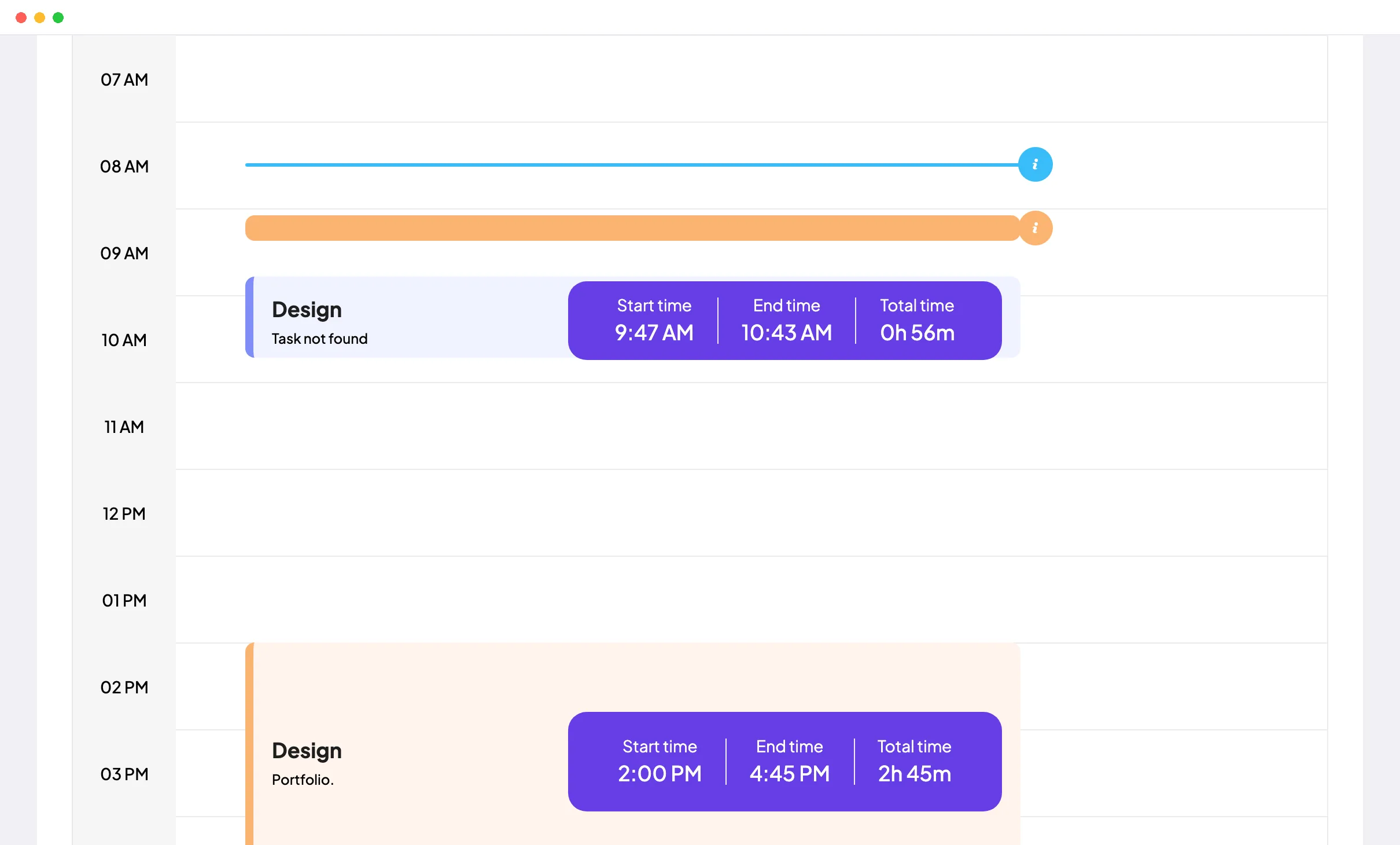
Create a project, invite your team by email and have each person install the desktop app for Windows, macOS or Linux. They start the timer on a project and task, and the Daily Timesheet shows each day as it happened.
Fixes: Time cards filled in from memory
Step 2 of 4
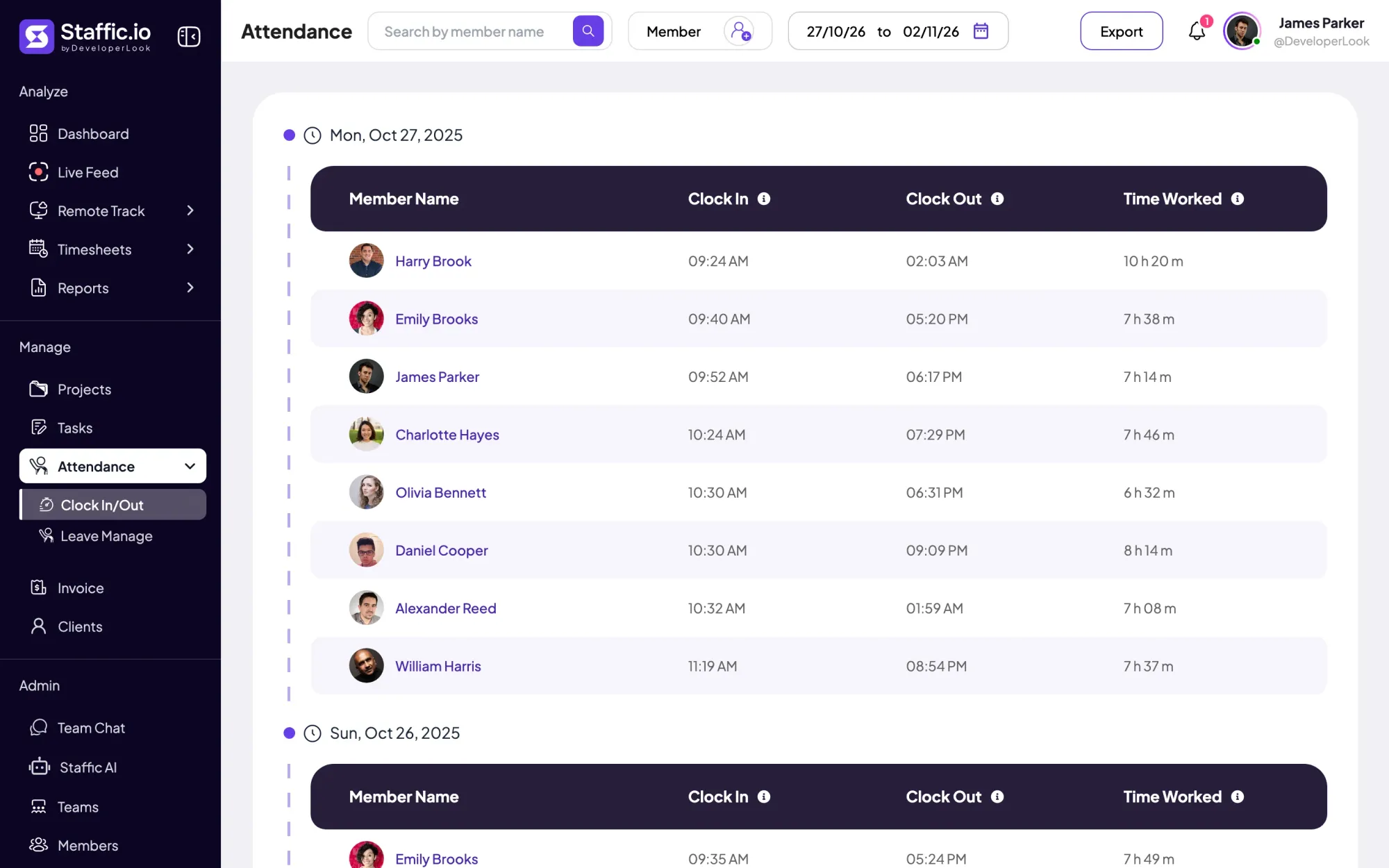
On Standard and Elite, Clock In/Out shows each person’s first and last tracked session of the day and the time worked in between, so nobody punches a separate clock. Remote and office staff land in the same list.
Fixes: No record of start and finish
Step 3 of 4
Hours fill daily, weekly and bi-weekly timesheets on every plan, with monthly and custom date ranges on Standard and Elite. Nobody adds up hours at the end of the week.
Fixes: Chasing timesheets every pay period
Recommended plan
Up to 3 members can use Free. Clock In/Out and monthly timesheets need Standard, and Payroll needs Elite. Set your team size to see what you would pay.
Your team needs
Billing
Standard
$1.00per user per month, billed yearly
Offer price until September 12, 2027. List price $5.50.
$8.00 a month for 8 members, $96.00 a year.
More than 3 members, and no invoices, payroll or recordings: Standard covers the rest.
Customer stories
Our Team Loves How Straightforward It Is We needed something that wouldn’t slow anyone down. This tool nails that: it’s efficient without being complicated
Staffic.io brings transparency without micromanagement. Our team feels trusted, and productivity has never been higher. The balance between oversight and autonomy is perfect for building strong remote culture.
FAQ
What owners ask before they replace paper time cards and spreadsheets.
Explore the live demoThe best time tracking software for small business is the one your team uses every day without being chased. Look for automatic tracking, timesheets you don’t have to add up, a free plan to start and prices per user, so cost follows headcount. Staffic does all four, and it adds Clock In/Out on Standard and Payroll on Elite.
Not always. If you pay by the hour, bill clients for time or want a record of when work started and ended, a team of five needs it as much as a team of fifty. Free covers up to 3 members, so five people need Standard.
Yes. On Elite, Staffic Payroll turns tracked hours and each member’s pay rate into payment-ready data, hourly, monthly or fixed. On Free and Standard, the timesheets give you the hours to enter in the payroll tool you use today.
Yes. Admins invite people by email from Members and remove them when they leave. Paid plans are priced per user per month, so the bill follows the size of the team.
Yes. You sign up with email, Google or Microsoft, each person installs the desktop app from the Download page, and every setting lives in the web app, so there’s no server to run. A setup checklist walks you through your first project, inviting a member and checking the first timesheet.
Yes. The desktop app records time on whichever computer a person uses, at the office or at home, and the hours land in the same timesheets. On Standard and Elite, Clock In/Out lists both groups side by side, so it works as a small business time clock for every location.
Staffic is free for up to 3 members. Standard is $5.50 per user per month billed yearly ($1.00 during the current offer), or $7.50 monthly, and Elite, which adds clients, invoices, payroll and screen recordings, is $5.80 billed yearly.
Free for up to 3 members
Create your first project, invite your team and watch the first timesheet fill in. Free for up to 3 members.




