Hours typed up on Friday
Billers and coders write down their week from memory. Nobody can say how long claims follow-up took next to coding review.
See step 1: Track hours by task
Features
All 33 featuresSee the work while it happens.
 DashboardYour team's week at a glance, Monday to Sunday
 Live FeedEliteSee who's tracking time right now, and on what
 ScreenshotsStandardVisual proof of work, captured automatically
 AppsWhich apps each tracked session used
 URLsThe websites behind the tracked time
 Screen RecordingsEliteFull session video, beyond a screenshot
01 / 33
Dashboard
The team dashboard: this week's hours, today's performance, top members, ongoing tasks, top projects and the most used apps and websites.
View DashboardHealthcare time tracking software
Staffic is healthcare time tracking software for staff who work at a computer: billing, coding, intake and patient support teams, in the office or at home. It records hours on each task, keeps attendance and leave in one place, and lets you choose what is captured and who sees it.
Healthcare challenges
Four gaps that time tracking for healthcare admin teams should close, once billing and support staff split their week between the office and home.
Billers and coders write down their week from memory. Nobody can say how long claims follow-up took next to coding review.
See step 1: Track hours by taskRemote staff send a message when they start and another when they finish. At month end, someone pieces the attendance record together by hand.
See step 2: Turn the timer into an attendance recordRequests arrive by email or in passing, and the balance each person has left lives in a spreadsheet only one manager opens.
See step 3: Handle leave in one placeStaff worry about screenshots when their work shows patient information. Leaders need to say plainly what is captured and who can see it.
See step 4: Choose what Staffic capturesHow Staffic helps
Hours, attendance and leave first, then the controls over what is recorded. Each step links to the feature behind it.
Step 1 of 5
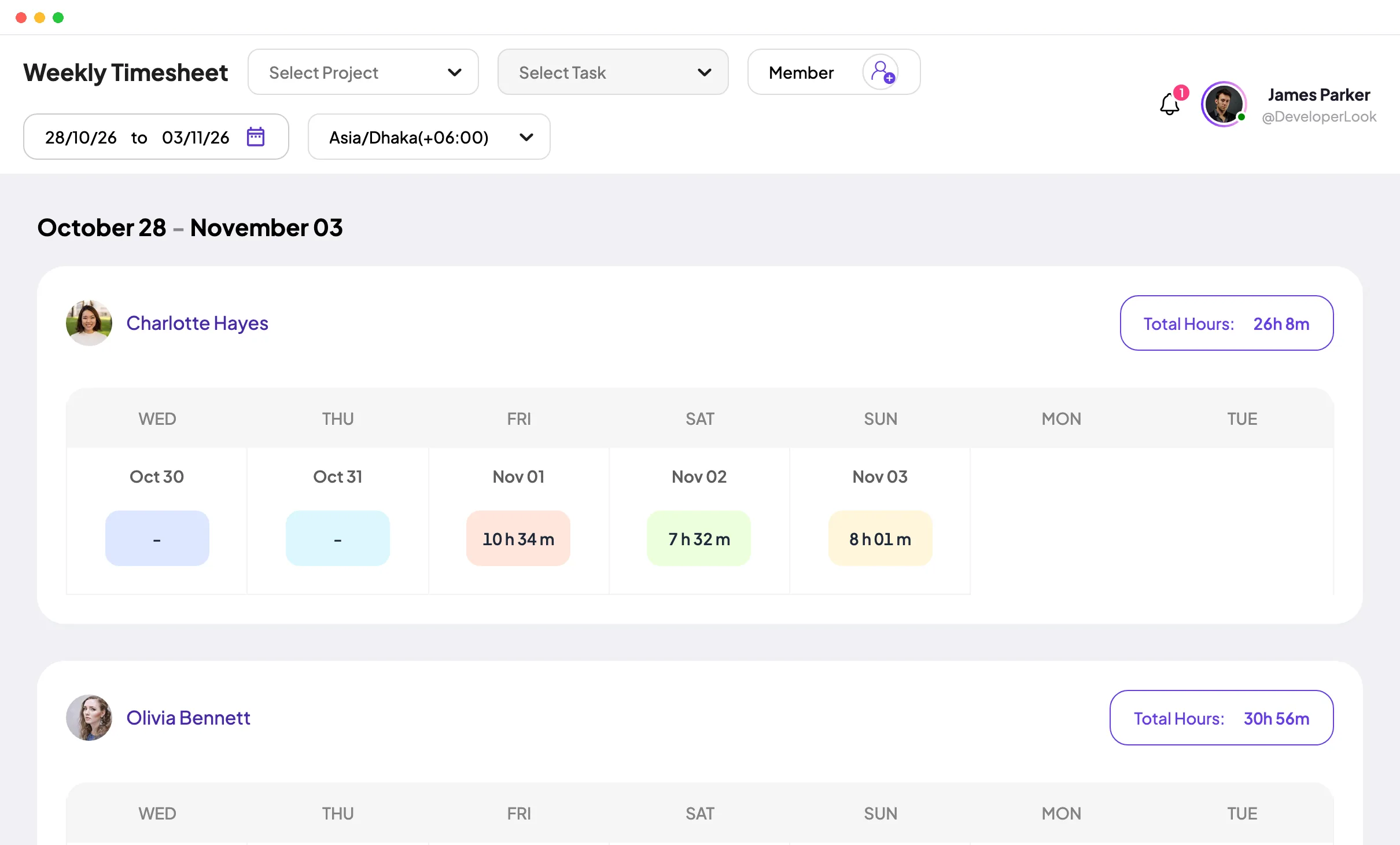
Set up each department or type of work as a project, with tasks such as claims follow-up or coding review. Staff start the desktop timer on Windows, macOS or Linux, and the hours land in daily, weekly and bi-weekly timesheets on every plan.
Fixes: Hours typed up on Friday
Step 2 of 5
On Standard and Elite, Clock In/Out shows when each person started, when they finished and how long they worked, day by day, without a separate punch. Export the record to PDF or Excel for payroll or HR.
Fixes: Start times spread across messages
Step 3 of 5
On Elite, staff apply for leave with dates and a reason, and an admin or leave manager approves or rejects it in Leave Management. Approved days come off each person's annual allowance.
Fixes: Leave tracked in an inbox
Step 4 of 5
If billing or coding screens show patient details, switch Screenshot Tracking off in Settings > Activity. Hours, attendance and leave keep working, and app, URL and keyboard and mouse tracking each have their own switch, so you keep only what you need.
Fixes: Screens that show patient details
Recommended plan
Timesheets work on Free for up to 3 people. Clock In/Out needs Standard, and leave requests and timesheet approval need Elite. Set your team size to see the price.
Your team needs
Billing
Standard
$1.00per user per month, billed yearly
Offer price until September 12, 2027. List price $5.50.
$10.00 a month for 10 members, $120.00 a year.
More than 3 members, and no invoices, payroll or recordings: Standard covers the rest.
Customer stories
Staffic.io brings transparency without micromanagement. Our team feels trusted, and productivity has never been higher. The balance between oversight and autonomy is perfect for building strong remote culture.
FAQ
What practice and operations managers ask before staff start tracking.
Explore the live demoHealthcare time tracking software records the hours staff work and the tasks they work on, for payroll, staffing and billing. Staffic is time tracking software for the healthcare industry's desk-based roles: staff start a desktop timer, and hours, attendance and leave land in one place.
Look for hours recorded without extra typing, attendance and leave next to the hours, control over what is captured, and staff who can see their own records. Staffic does all four for staff who work at a computer, such as billing, coding and patient support teams.
Only what you switch on in Settings > Activity, and only while the timer runs: time on each task, keyboard and mouse activity levels, apps and URLs, and screenshots on Standard and Elite. Screen recordings are Elite only and off by default. When the timer is off, nothing is recorded.
Yes. Screenshot tracking is an organization-wide switch in Settings > Activity, and time, attendance and leave keep working with it off. Screenshots taken before you switch it off are kept for 365 days unless an admin deletes them sooner.
Admins see every member's records, and each staff member sees only their own. To give a manager team-wide access to one area, such as Attendance, Timesheets or Reports, assign them an Access Control role on their Member Details page.
Use Clock In/Out on Standard or Elite for start and finish times, and Leave Management on Elite for requests and approval. Clock-ins follow your organization's time zone, so staff working from different places share one attendance record.
Staffic is free for up to 3 members. Standard is $5.50 per user per month billed yearly ($1.00 during the current offer), or $7.50 monthly, and Elite, which adds clients, invoices, payroll and screen recordings, is $5.80 billed yearly.
Free for up to 3 members
Invite your billing or support team, decide what Staffic records, and review the first timesheets.




