Agents missing at queue open
The lines open at eight and two agents haven't started yet. In an office you'd notice the empty seats; at home, you find out when wait times climb.
See step 2: Spot a missing agent early
Features
All 33 featuresSee the work while it happens.
 DashboardYour team's week at a glance, Monday to Sunday
 Live FeedEliteSee who's tracking time right now, and on what
 ScreenshotsStandardVisual proof of work, captured automatically
 AppsWhich apps each tracked session used
 URLsThe websites behind the tracked time
 Screen RecordingsEliteFull session video, beyond a screenshot
01 / 33
Dashboard
The team dashboard: this week's hours, today's performance, top members, ongoing tasks, top projects and the most used apps and websites.
View DashboardCall center monitoring software
Staffic is call center monitoring software for the computers your agents work on, at home or in the office. It records time on each client account, activity levels, apps and URLs, and attendance, and Live Feed shows who is working now on Elite. It doesn't record or score calls, so it runs next to your phone system.
Call center challenges
Four gaps that open up once agents work from home or across several client accounts.
The lines open at eight and two agents haven't started yet. In an office you'd notice the empty seats; at home, you find out when wait times climb.
See step 2: Spot a missing agent earlyAgents report their own start and finish times. Nobody checks them against the work until a client asks why the line was short that morning.
See step 4: Keep attendance without a punch clockYour team handles three client accounts in one day. Call center time tracking has to show which hours went to which account, not just how long someone was signed in.
See step 1: Track time by client accountLong gaps between tickets only show up when the queue backs up. You want to see active and idle time per agent without listening in on anyone.
See step 5: Review activity and performanceHow Staffic helps
Five steps an operations lead runs in Staffic. Each one links to the feature behind it.
Step 1 of 5
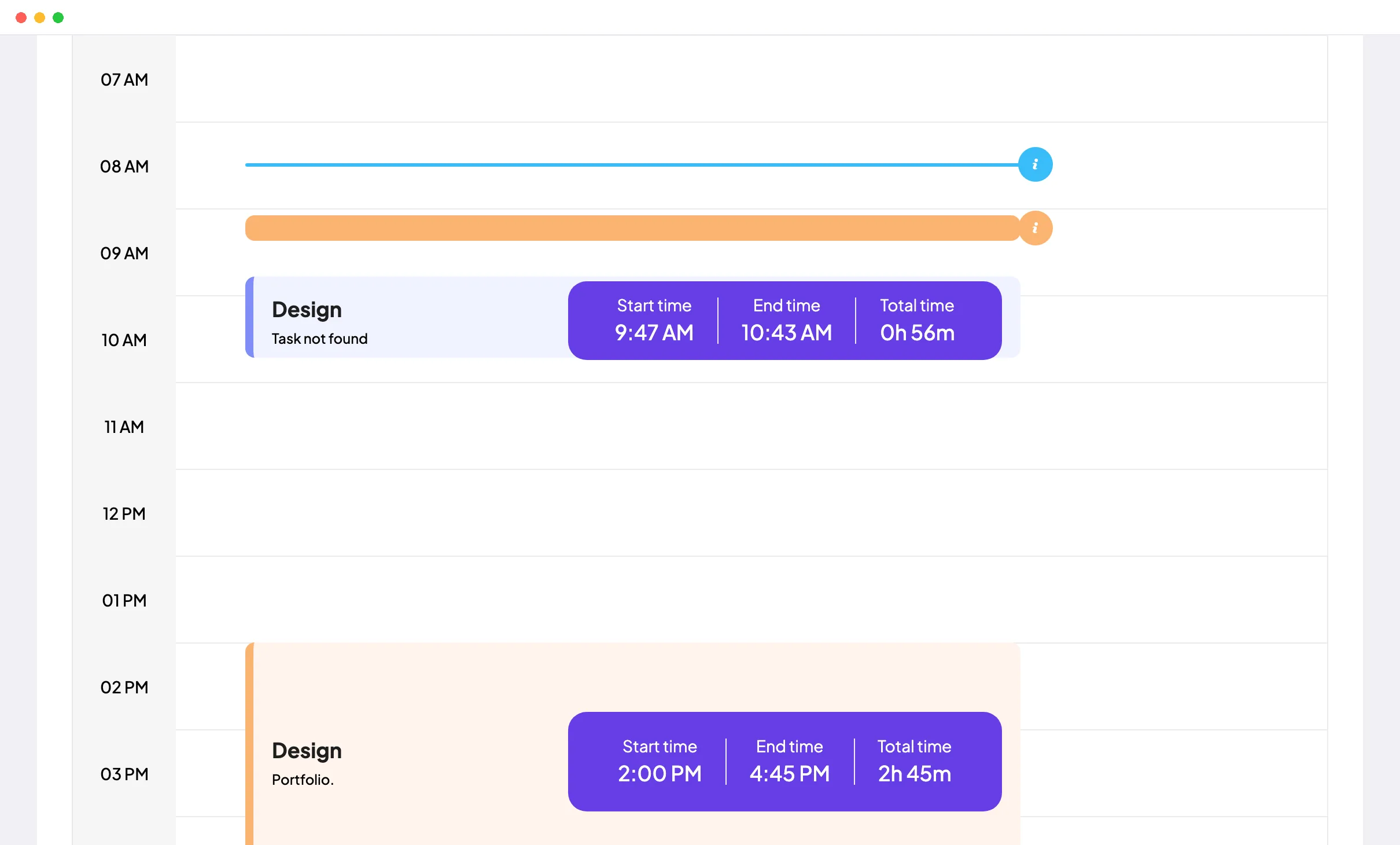
Set up each client or campaign as a project, with tasks for the work inside it. Agents start the desktop timer on Windows, macOS or Linux on the right project and task, and the Daily Timesheet shows each stretch of work and the gaps between them.
Fixes: Hours split across clients
Step 2 of 5
When the queue opens, Live Feed (Elite) lists the agents whose timer is running and the client project and task each one picked. Anyone missing stands out before the backlog does, and a name search checks one person.
Fixes: Agents missing at queue open
Step 3 of 5
The Apps and URLs usage report (Standard and Elite) lists the apps and websites each agent used per day, with total time, so hours in the CRM or help desk are easy to tell apart from everything else. Per-session lists are on every plan.
Step 4 of 5
Clock In/Out takes each agent's first and last tracked time of the day as their clock in and clock out, with time worked, and exports to PDF or Excel on Standard and Elite. On Elite, agents request leave in Staffic and you approve it in Leave Management.
Fixes: Start times on trust
Step 5 of 5
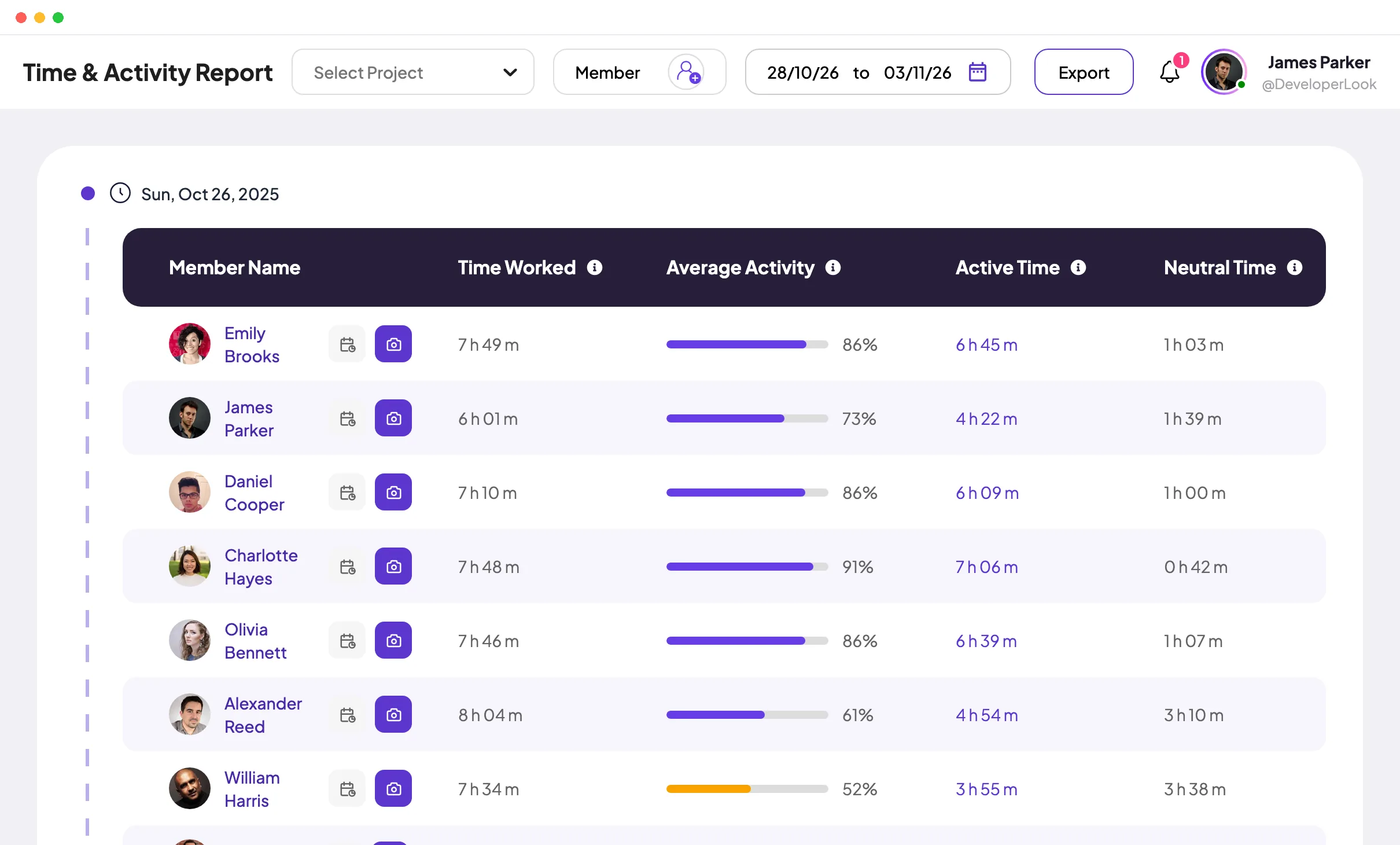
The Time and Activity report splits each agent's day into active and neutral (idle) time, and the Performance report shows hours and trends per member, both on Standard and Elite. On Standard the dashboard ranks agents by time logged, and Elite adds a ranking by activity.
Fixes: Idle time nobody sees
Recommended plan
Clock In/Out and the reports need Standard. Live Feed, instant screenshots and leave approval need Elite. Set your team size to see what you would pay.
Your team needs
Billing
Standard
$1.00per user per month, billed yearly
Offer price until September 12, 2027. List price $5.50.
$25.00 a month for 25 members, $300.00 a year.
More than 3 members, and no invoices, payroll or recordings: Standard covers the rest.
Customer stories
Staffic.io's live feed lets me check in without interrupting my team. Remote management finally feels natural. I can see progress in real-time without constant meetings or status updates that drain productivity.
We discovered our best employees with Staffic.io's performance analytics. Promotions are now merit based, not political. The objective data eliminated bias and created a fair culture where hard work is recognized and rewarded.
Staffic.io brings transparency without micromanagement. Our team feels trusted, and productivity has never been higher. The balance between oversight and autonomy is perfect for building strong remote culture.
FAQ
What operations leads ask before they roll Staffic out to agents.
Explore the live demoCall center monitoring software shows managers how agents spend their working time, whether they sit in the office or at home. Some tools record and score calls, which is call center quality monitoring software. Staffic is call center time tracking software for the desktop side instead: time per client account, activity, apps and URLs, and attendance.
Use Clock In/Out, on Standard and Elite. An agent's clock in is the moment their Staffic desktop timer first starts that day, not their phone system login, and the clock out is when the last tracked session ends. Days follow your organization's time zone, and the record exports to PDF or Excel.
Yes, as idle time rather than a break button. A stretch of 50 seconds or more without keyboard or mouse input counts as idle, and tracking stops after 5 minutes without input or when the computer sleeps or locks. When you allow manual time (Standard and Elite), an agent who spent a long call away from the keyboard can add it with a reason, and Manual Time Reports lists every addition.
Staffic measures time and activity, not call outcomes. Activity levels come from keyboard and mouse input during tracked time, and the Time and Activity and Performance reports (Standard and Elite) show them per agent. Handle time and resolution rates still come from your phone or help desk system.
It depends on where your agents work, so check the rules for each country or state and ask a lawyer if you're unsure; this isn't legal advice. Whatever the rules, tell agents in writing what you record and why. Staffic records only while an agent's timer runs, agents can see their own records, and you choose what is captured in Settings > Activity.
Yes. Set up each client account as a project with its own tasks, and group agents into teams on Standard and Elite. On Elite you can also add each client and assign their projects to it, so hours and invoices stay separate per client. An Access Control role lets a team lead see the whole team's records in one area, such as Attendance or Reports.
Staffic is free for up to 3 members. Standard is $5.50 per user per month billed yearly ($1.00 during the current offer), or $7.50 monthly, and Elite, which adds clients, invoices, payroll and screen recordings, is $5.80 billed yearly.
Free for up to 3 members
Create a project for one client account, invite a few agents and see their first day of tracked time.




