Every phase in one bucket
Hours for schematic design, design development and construction documents land in one total. When the next proposal is due, nobody can say what each phase really took.
See step 1: Set up projects and phases
Features
All 33 featuresSee the work while it happens.
 DashboardYour team's week at a glance, Monday to Sunday
 Live FeedEliteSee who's tracking time right now, and on what
 ScreenshotsStandardVisual proof of work, captured automatically
 AppsWhich apps each tracked session used
 URLsThe websites behind the tracked time
 Screen RecordingsEliteFull session video, beyond a screenshot
01 / 33
Dashboard
The team dashboard: this week's hours, today's performance, top members, ongoing tasks, top projects and the most used apps and websites.
View DashboardTime tracking software for architects
Staffic is time tracking software for architects: each person's desktop timer records hours against the project and design phase they pick. Budgets show how much of the fee is used, timesheets break hours down by project and phase, and on Elite the same hours become client invoices.
Architecture firm challenges
Four moments when hours and fees drift apart in a design practice.
Hours for schematic design, design development and construction documents land in one total. When the next proposal is due, nobody can say what each phase really took.
See step 1: Set up projects and phasesHours spent in drawings and models get pieced together from memory at the end of the week. Site visits and client calls drop out of the record.
See step 2: Track time on the right phaseYou learn a fixed fee is spent when the drawings still need another round of revisions. By then the hours can't be won back.
See step 3: Watch the fee as it's spentBilling a client means copying hours from timesheets into a spreadsheet, then into an invoice, and checking every line twice.
See step 5: Invoice the clientHow Staffic helps
Five steps that keep hours, phases and fees in one place. Each one links to the feature behind it.
Step 1 of 5
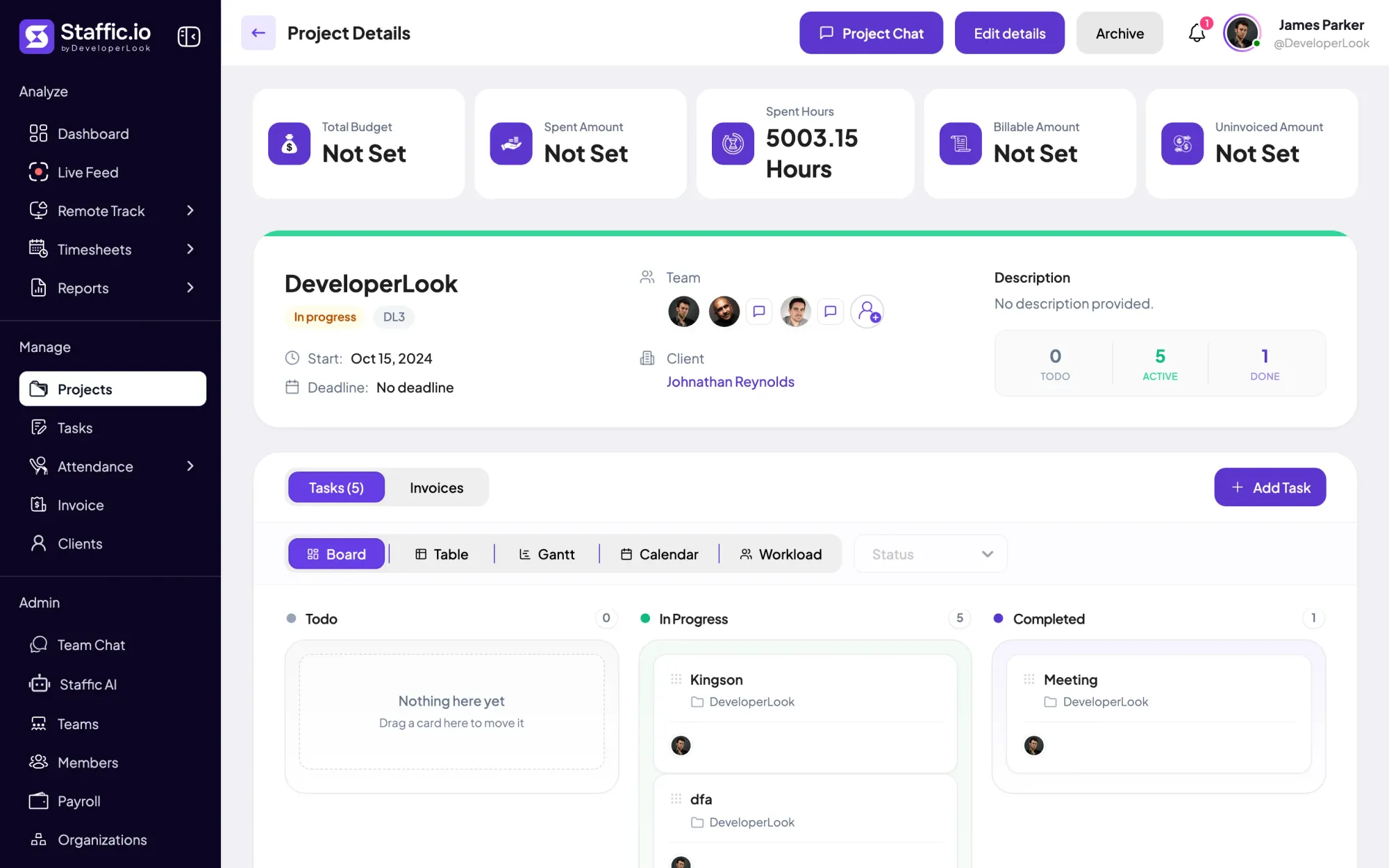
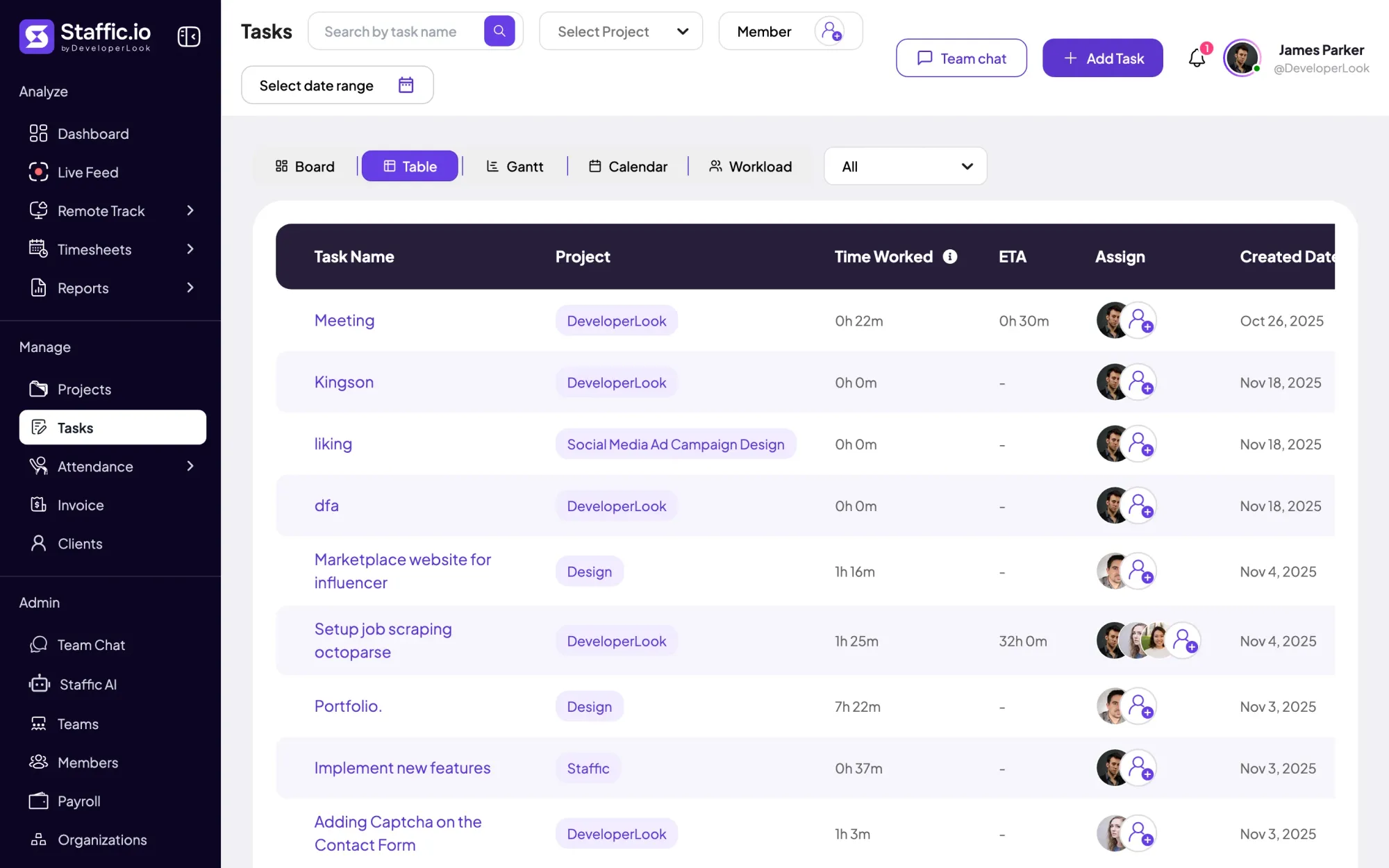
Create a project for each commission, with a project code, a deadline and, on Elite, its client. Add a task for each phase, such as schematic design or construction documents, and give it an estimate in hours.
Fixes: Every phase in one bucket
Step 2 of 5
Each person starts the timer in the Staffic desktop app on Windows, macOS or Linux and picks the project and phase. A work note says what was done. On Standard, time away from the computer, like a site visit, can be added as manual time with a reason.
Fixes: Timesheets filled in on Friday
Step 3 of 5
On Standard, give a project a budget in total hours or total cost and choose when admins get an email, for example at 80% used. Each phase shows its estimate next to the hours worked, so an overrun shows while there's still time to act.
Fixes: Fee overruns found too late
Step 4 of 5
Weekly and bi-weekly timesheets filter by project and phase, and so do monthly and custom ones on Standard. The Time and Activity report exports each member's hours on a project to PDF or Excel on Standard.
Step 5 of 5
On Elite, link a project to its client and add it to an invoice. The line fills in the billable amount not yet invoiced, at your hourly rates or the fixed fee. Add tax or a discount, send it by email and record payments as they arrive.
Fixes: Invoices rebuilt by hand
Recommended plan
Project budgets and billing rates come with Standard. Firms that send client invoices from Staffic need Elite. Set your team size to see what you would pay.
Your team needs
Billing
Elite
$5.80per user per month, billed yearly
$46.40 a month for 8 members, $556.80 a year.
Elite adds the client invoices you picked.
Customer stories
Staffic.io transformed how we track productivity. Our remote team is now more accountable and transparent than ever. The detailed reports and activity monitoring have been game-changing for us.
Our Team Loves How Straightforward It Is We needed something that wouldn’t slow anyone down. This tool nails that: it’s efficient without being complicated
FAQ
What principals and project leads ask before they track hours by phase.
Explore the live demoThe best fit records hours by project and phase, compares them with the fee and bills from the same hours. Staffic does all three: phases as tasks with estimates, budgets on Standard and invoices on Elite. If one person only needs a simple timer, a lighter tool may be enough.
Each commission is a project and each phase is a task inside it. People start the timer in the Staffic desktop app on the phase they're working on. Staffic records the time, activity levels, apps and URLs until they stop, and timesheets show the hours by project and phase.
Yes. Task details show each phase's estimate next to the hours worked, and timesheets filter by project and task. Weekly and bi-weekly views come with every plan; monthly and custom date ranges need Standard.
Yes, on Standard. Set each project to an hourly rate or a fixed fee, then add a budget in total hours or total cost with an email alert to admins. The project page shows spent hours and the spent amount next to the budget.
Yes, on Elite. Add each client, link their projects and create invoices that fill in the billable amount not yet invoiced, at your hourly rates or the fixed fee. You can add tax and discounts, send the invoice by email and record payments.
Staffic is free for up to 3 members. Standard is $5.50 per user per month billed yearly ($1.00 during the current offer), or $7.50 monthly, and Elite, which adds clients, invoices, payroll and screen recordings, is $5.80 billed yearly.
Free for up to 3 members
Create a project, add its phases as tasks, invite your team and see the first week of hours.




