Every client billed a different way
One client pays by the hour, another a monthly retainer, a third a fixed fee. One spreadsheet can’t keep the three apart for long.
See step 1: Set up each client and how they pay
Features
All 33 featuresSee the work while it happens.
 DashboardYour team's week at a glance, Monday to Sunday
 Live FeedEliteSee who's tracking time right now, and on what
 ScreenshotsStandardVisual proof of work, captured automatically
 AppsWhich apps each tracked session used
 URLsThe websites behind the tracked time
 Screen RecordingsEliteFull session video, beyond a screenshot
01 / 33
Dashboard
The team dashboard: this week's hours, today's performance, top members, ongoing tasks, top projects and the most used apps and websites.
View DashboardTime tracking software for consultants
Staffic is time tracking software for consultants: you time each client’s project from the desktop app, bill it at a project or person hourly rate or a fixed fee, and log calls as manual time. On Elite, invoice lines fill in with the amount not yet billed.
Consultant challenges
Four ways billable time goes missing between the work and the bill.
One client pays by the hour, another a monthly retainer, a third a fixed fee. One spreadsheet can’t keep the three apart for long.
See step 1: Set up each client and how they payThe client call ran long and the follow-up email took another half hour. Neither was on a timer, so neither gets billed.
See step 2: Track the work, on and off the computerA client reads the invoice and asks what they paid for. Rebuilding the answer from your calendar and inbox takes an afternoon.
See step 3: Send clients a report they can readTime logged after the last invoice is easy to miss when you build the next one by hand, so it stays unbilled.
See step 4: Invoice what hasn’t been billedHow Staffic helps
Staffic works as time tracking and billing software for consultants: set up each client once, and tracked hours carry through to the bill.
Step 1 of 4
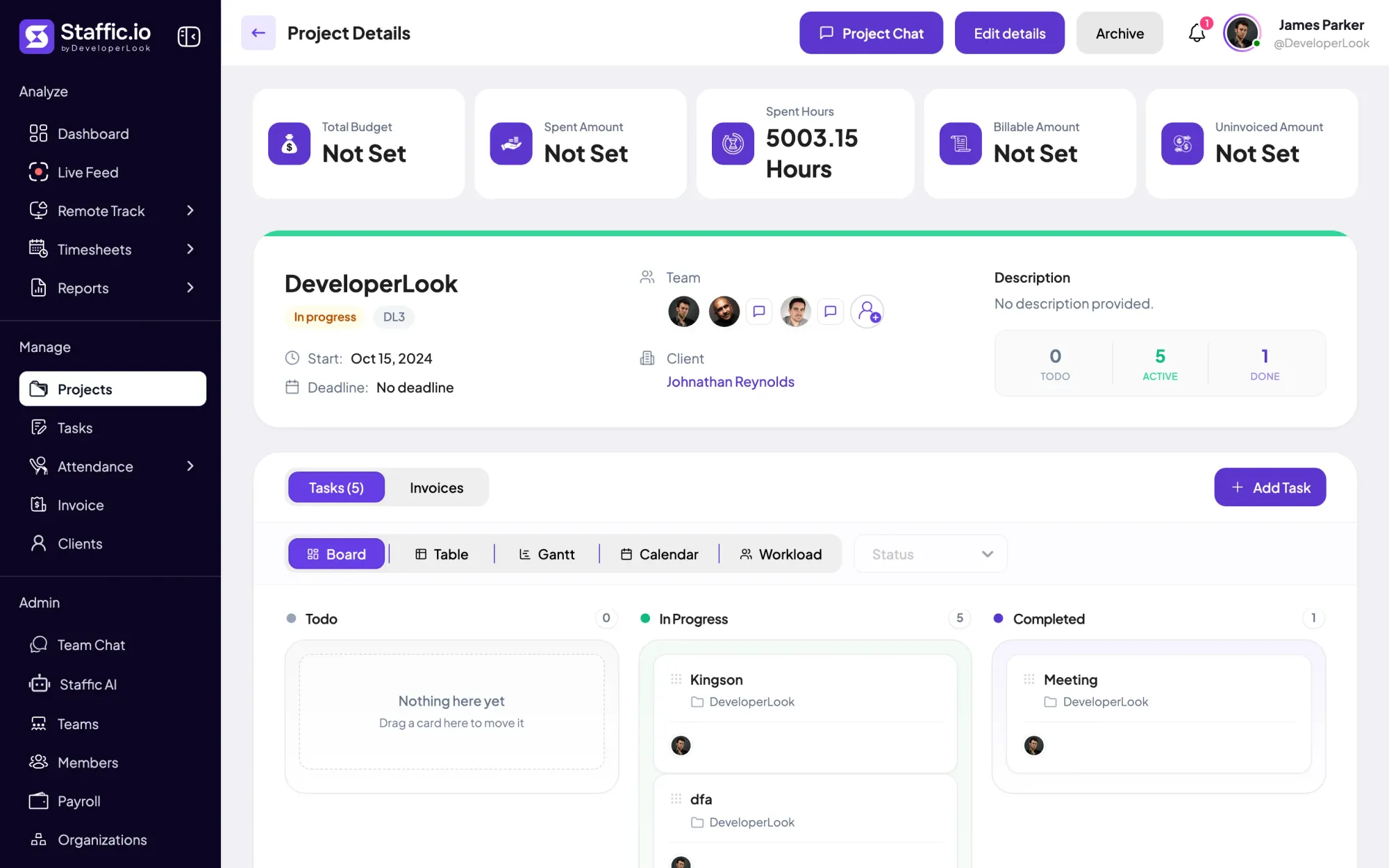
Create a project for each engagement and, on Standard or Elite, set its billing: an hourly rate for the project or for each person, or a fixed fee. Give a retainer a budget in hours or money, and Staffic emails admins when it reaches the share you set.
Fixes: Every client billed a different way
Step 2 of 4
Start the desktop timer on the client’s project and task and add a work note. Calls and meetings away from the computer go in as manual time on Standard and Elite, with a reason that shows in the Manual Time report.
Fixes: Calls that never reach a timesheet
Step 3 of 4
On Standard and Elite, filter the Time and Activity report by the client’s project and dates: it lists time worked and activity per member and day. Download it as PDF or Excel and send it alongside the invoice.
Fixes: Clients who ask what the hours were
Step 4 of 4
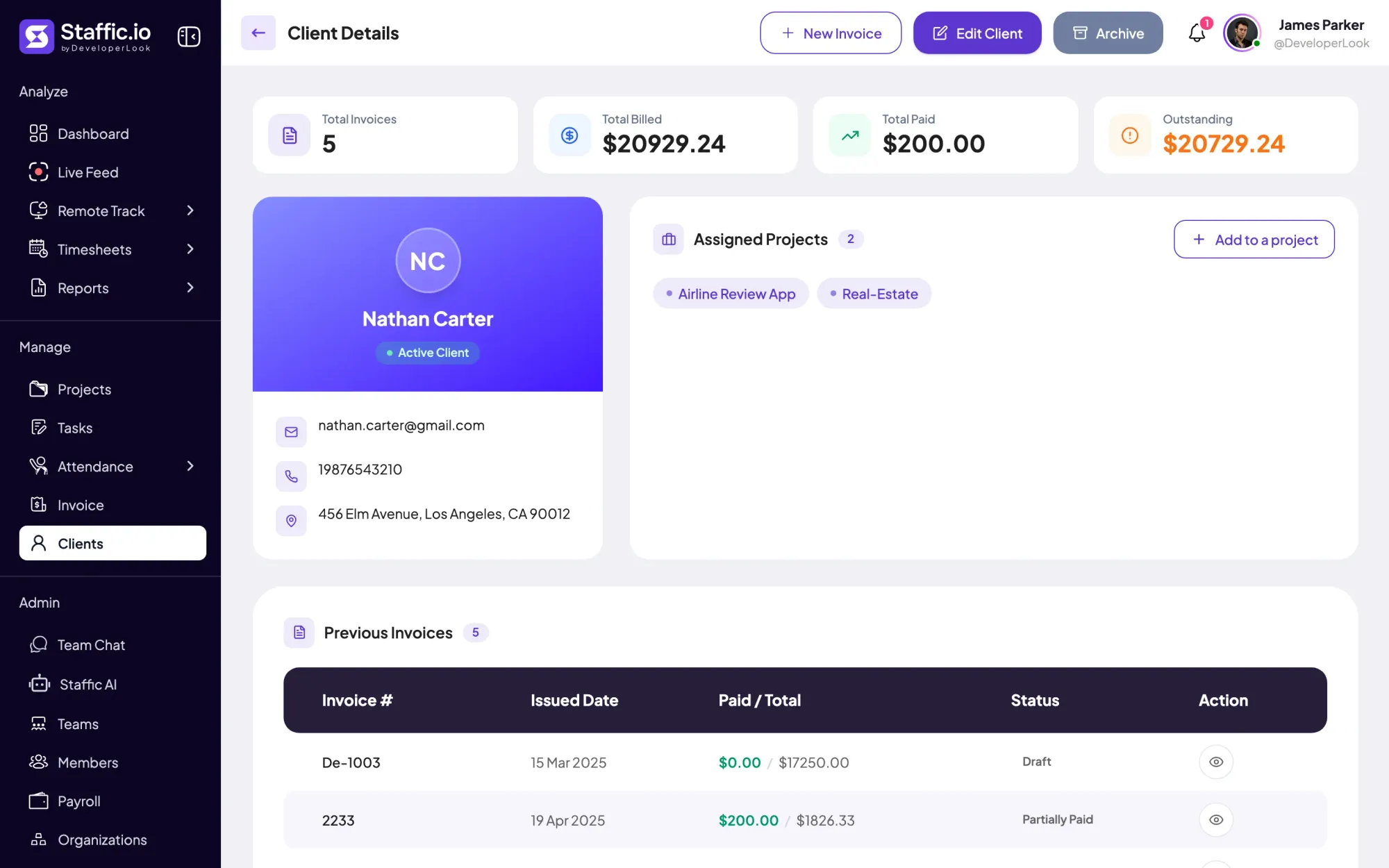
On Elite, add a line linked to the client’s project and Staffic fills in the billable amount earlier invoices haven’t covered. Email the invoice with a link the client can open, or download the PDF, then record payments until the balance is settled.
Fixes: Hours left out of the next invoice
Recommended plan
Billing rates, budgets, manual time and client reports start on Standard. Clients and invoices need Elite, so the picker starts there. Set your team size to see the price.
Your team needs
Billing
Elite
$5.80per user per month, billed yearly
$29.00 a month for 5 members, $348.00 a year.
Elite adds the client invoices you picked.
Customer stories
Our Team Loves How Straightforward It Is We needed something that wouldn’t slow anyone down. This tool nails that: it’s efficient without being complicated
Staffic.io brings transparency without micromanagement. Our team feels trusted, and productivity has never been higher. The balance between oversight and autonomy is perfect for building strong remote culture.
FAQ
What independent consultants and professional services firms ask before moving billing off spreadsheets.
Explore the live demoGive each client a project and set how it bills: an hourly rate for the project or for each person, or a fixed fee (Standard and Elite). Then start the desktop timer on that project and task, and every hour lands against the right client in your timesheets.
Set the project to a fixed fee, or give a retainer a budget in hours or money with a Notify At level. Staffic emails admins when the project reaches that share of the budget, so you can talk to the client before the hours run out. Budgets and billing are on Standard and Elite.
Yes, on Standard and Elite. Add the time to a project and task with a start, an end and a reason; members can add their own once an admin allows manual time in Timesheet Settings. Every entry shows in the Manual Time report, so you can see what was added and why.
Most under-billing is time that never got recorded. Log calls as manual time, check the Manual Time report before you bill, and set budget alerts so a retainer doesn’t run past its hours unnoticed. On Standard and Elite, each project page shows its billable and uninvoiced amounts.
Yes. Filter the Time and Activity report to the client’s project and the billing period, then download it as PDF or Excel with time worked and activity per member and day. Send it with the invoice; the report is on Standard and Elite, invoices on Elite.
On Elite, create an invoice for the client and add a line linked to their project. Staffic fills in the billable amount that earlier invoices haven’t covered, at the project or person rate or the fixed fee. Add tax or a discount, then email it or download the PDF.
Staffic is free for up to 3 members. Standard is $5.50 per user per month billed yearly ($1.00 during the current offer), or $7.50 monthly, and Elite, which adds clients, invoices, payroll and screen recordings, is $5.80 billed yearly.
Free for up to 3 members
Create a project, start the desktop timer and see the hours in today’s timesheet. Free for up to 3 members; billing rates start on Standard.




