Filled in at the end of the month
Time in and time out get written from memory days later, so the DTR shows the hours someone was supposed to work, not the hours they did.
See step 1: Time in starts with the desktop timer
Features
All 38 featuresSee the work while it happens.
 DashboardYour team's week at a glance, Monday to Sunday
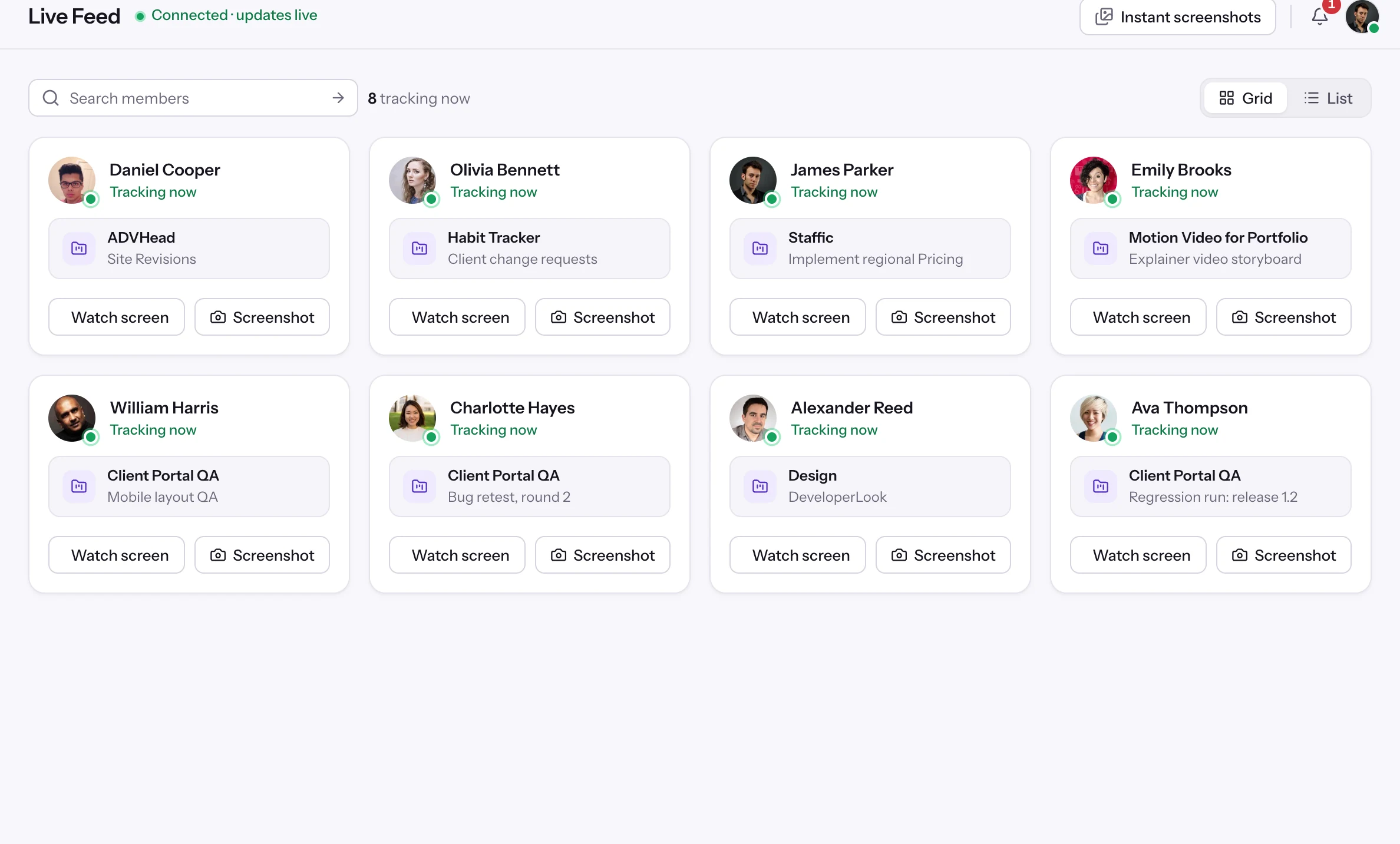
 Live FeedSee who's tracking time right now, and on what
 ScreenshotsVisual proof of work, captured automatically
 AppsWhich apps each tracked session used
 URLsThe websites behind the tracked time
 Screen RecordingsEliteFull session video, beyond a screenshot
01 / 38
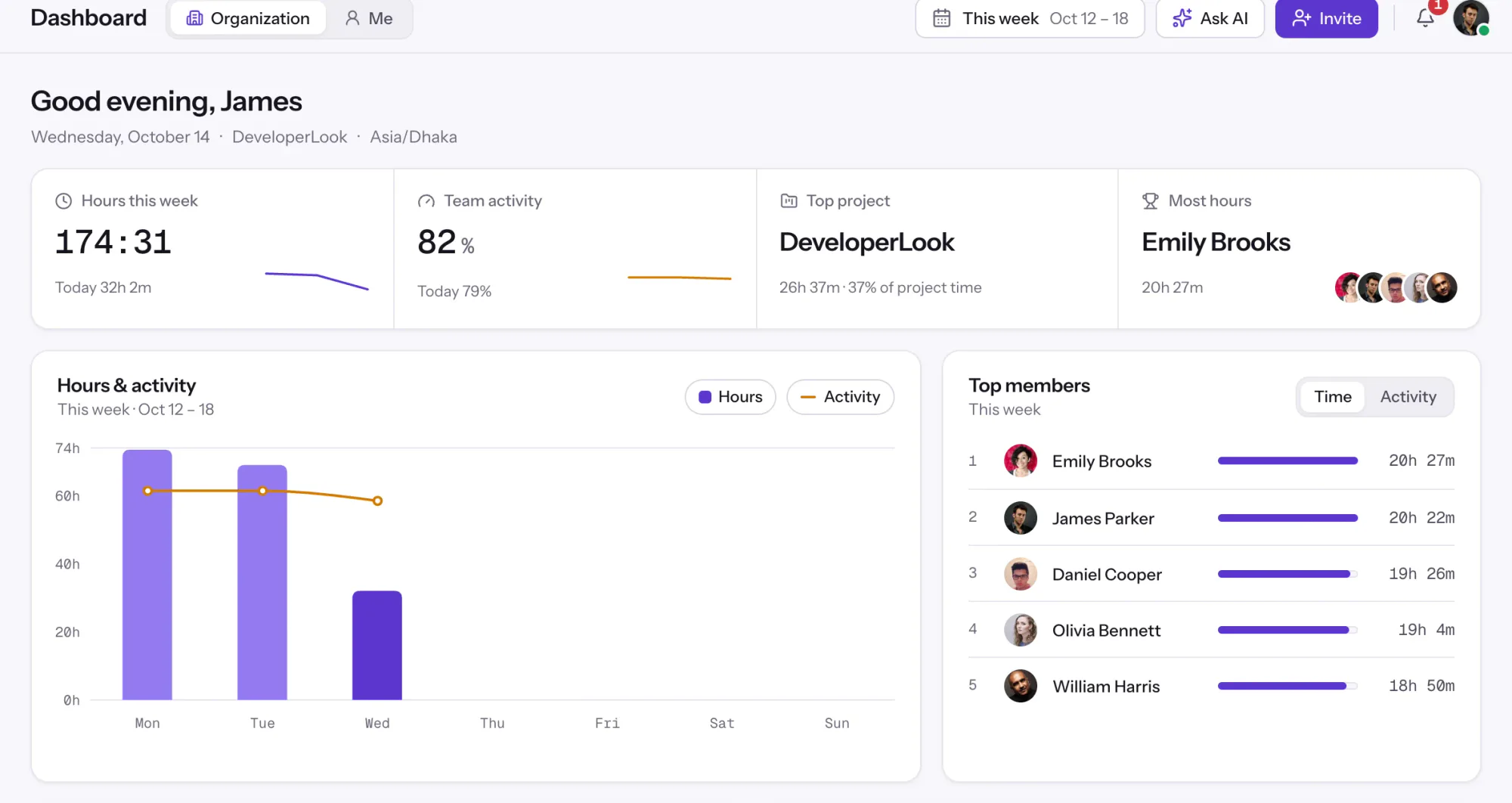
Dashboard
The team dashboard: this week's hours, team activity, top members, ongoing tasks, top projects and the most used apps and websites.
View DashboardSolutions
All 38 featuresHow remote, hybrid and growing teams run Staffic.
 Remote teamsRemote employee time tracking
 Team managersTeam management software
 Large organizationsEnterprise time tracking software
 Remote employee monitoringRemote employee monitoring software
 Remote employee managementRemote employee management software
 Hybrid teamsHybrid work software
 Remote teams in the PhilippinesDaily time record (DTR)
Staffic for the way you work, from freelancing to client billing.
 FreelancersFreelance time tracking
 Small businessesTimekeeping software for small business
 Call centersCall center monitoring software
 ConsultantsTime tracking software for consultants
 Companies with contractorsContractor time tracking
 Virtual assistantsTime tracking software for virtual assistants
 AgenciesAgency time tracking software
 Accounting firmsTime tracking software for accountants
 Software teamsTime tracking software for engineers
Staffic set up for your industry's records and reports.
01 / 20
Track remote hours across every time zone.
Staffic records time, activity and optional screenshots on each remote member’s computer, then turns them into timesheets you approve, so you can trust the hours without daily check-ins.
View Remote teamsDaily time record (DTR)
Staffic keeps an online daily time record for remote teams and VAs in the Philippines. The desktop timer logs each day's time in, time out and hours worked, Clock In/Out turns them into a DTR you can export to PDF or Excel, and timesheet approval checks it before payroll. Free for up to 3 members.
DTR challenges
Four problems remote teams in the Philippines run into when the daily time record is written up by hand.
Time in and time out get written from memory days later, so the DTR shows the hours someone was supposed to work, not the hours they did.
See step 1: Time in starts with the desktop timerTeams who work during a client's day abroad start in the evening and finish after midnight, and a paper DTR splits that work across two lines.
See step 2: A DTR line for every daySupervisors compare each DTR with chats and outputs before they sign it, and a missing time out turns into a back and forth.
See step 3: Approve the hours, add what was missedHR copies each person's hours into a spreadsheet before every payroll cutoff, and one wrong cell changes someone's pay.
See step 4: Export the cutoff for payrollHow Staffic helps
For BPOs, VA agencies and companies with remote staff in the Philippines.
Step 1 of 4
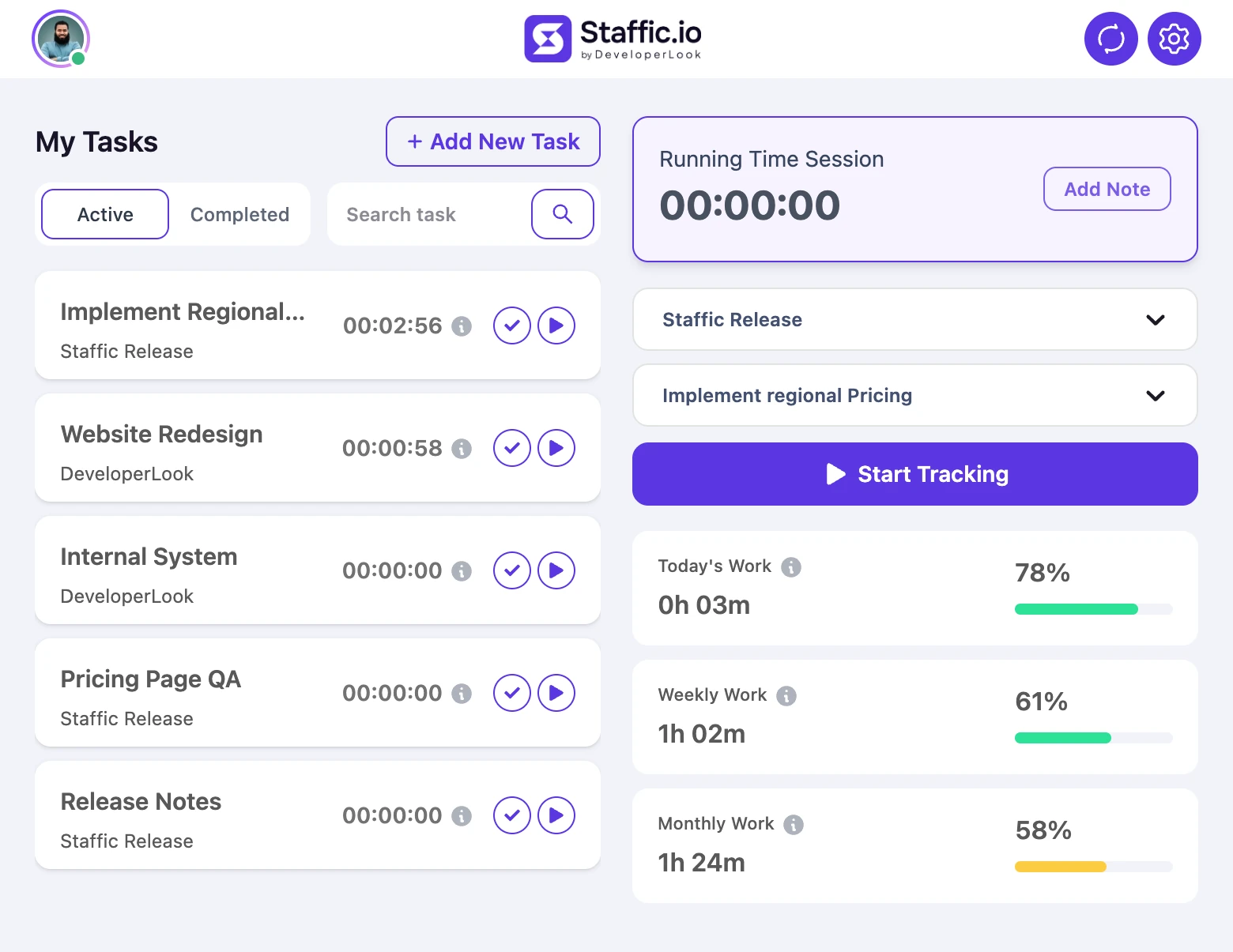
Each member installs the desktop app on Windows, macOS or Linux and starts the timer on a project and task. Tracking stops after 5 minutes without keyboard or mouse input, so idle stretches and breaks with the timer off stay out of the hours worked.
Fixes: Filled in at the end of the month
Step 2 of 4
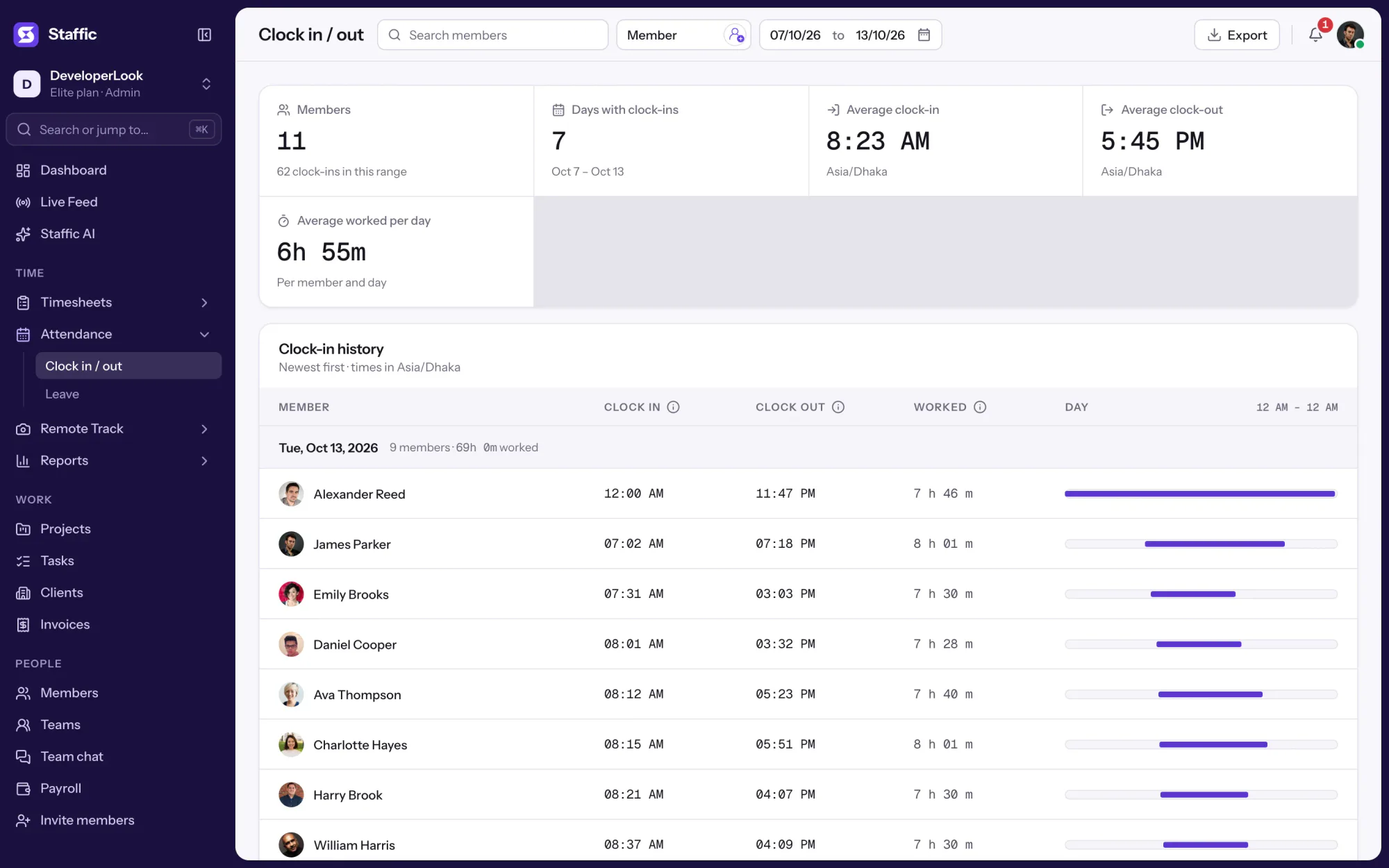
Clock In/Out shows each member's time in, time out and hours worked for every day in the range. Days follow the organization's time zone and each session counts on the day it started, so work that runs past midnight stays on one line.
Fixes: Work hours that cross midnight
Step 3 of 4
With Timesheet Approval on, each finished day waits on the Awaiting tab, where an admin approves or rejects it for one member or the whole team. Forgotten time goes in as manual time with a reason, and the Manual Time report lists every change.
Fixes: Checking every line before signing
Step 4 of 4
Pick the cutoff dates and export Clock In/Out to PDF or Excel with the date, member, clock in, clock out and time worked. On Elite, Payroll turns the hours into pay at each member's rate.
Fixes: Retyping the DTR every cutoff
Set this up for your team today.Free for up to 3 members, no card needed. Or click through the real app with sample data first.
Recommended plan
Clock In/Out, approval and exports are on every plan, Free included. Payroll needs Elite.
Your team needs
Billing
Standard
$7.50per user per month, billed yearly
$60.00 a month for 8 members, $720.00 a year.
More than 3 members, and no invoices, payroll or recordings: Standard covers the rest.
7-day free trial. Card at checkout, cancel within 7 days and pay nothing.
Customer stories
Staffic.io transformed how we track productivity. Our remote team is now more accountable and transparent than ever. The detailed reports and activity monitoring have been game-changing for us.
Staffic.io brings transparency without micromanagement. Our team feels trusted, and productivity has never been higher. The balance between oversight and autonomy is perfect for building strong remote culture.
FAQ
For HR teams, supervisors and remote staff who keep a DTR.
Explore the live demoA daily time record, or DTR, is a day by day record of an employee's time in, time out and hours worked, usually signed by the employee and their supervisor for each pay period. Teams in the Philippines use it to check attendance and to compute pay.
Yes. In Staffic, the desktop timer records when each member starts and stops work, and Clock In/Out shows their time in, time out and hours worked for every day. You can view any date range and export it to PDF or Excel.
Time with the timer off isn't counted, and tracking stops after 5 minutes with no keyboard or mouse input. A lunch break taken with the timer off shows as a gap between time in and time out and is left out of the hours worked.
Not the tracked times. Missing time is added as manual time with a reason, by admins or by members when the admin allows it, and the Manual Time report lists every addition and deletion. With Timesheet Approval on, an admin approves or rejects each day.
Yes. Days follow your organization's time zone, and a session counts on the day it started, so work that begins in the evening and ends after midnight stays on one day. Timesheets can also show hours in each member's own time zone.
Yes. Staffic's Free plan covers up to 3 members with the same features as Standard, including Clock In/Out, timesheet approval and PDF and Excel exports. Teams of more than 3 move to Standard or Elite.
Staffic is free for up to 3 members. Standard is $7.50 per user per month billed yearly, or $9.50 monthly, and Elite, which adds clients, invoices, payroll, screen recordings and Live Screening, is $10.00 billed yearly.
Free for up to 3 members
Invite your team, install the desktop app and see today's time in and time out on Clock In/Out. Free for up to 3 members.